Requirements
DV Lottery Photo Rules: Don't Get Disqualified
DV lottery photo rules: a 600x600 JPEG under 240 kB, a separate photo per family member, and the reuse rule that makes an entry ineligible.
Making the photo now? DV lottery photo: exact size and free check

By Antoine Duno
Updated Published 12 min read
Specs verified on September 16, 2026 against the issuing authority
The Diversity Visa entry itself takes about fifteen minutes, and from the DV-2027 cycle it carries a $1 fee. The photograph is where entries die. Not because the specification is hard, but because three of its rules are unforgiving in a way most online forms are not: the photo has to be new, every person on the entry needs their own, and a photo that has been manipulated can make you ineligible outright.
DV-2027 entry dates: not confirmed as of October 6, 2026. We could not find official dates for the DV-2027 entry period. On October 6, 2026, travel.state.gov, dvprogram.state.gov and the U.S. embassy pages that usually mirror them showed us a bot check, and the Federal Register, where the Department of State published the DV-2026 instructions on October 1, 2024, had no DV-2027 instructions. The Department's final rule of March 11, 2026 says it "anticipates the deferral of the opening of the entry period for the 2027 Diversity Visa program year." Check dvprogram.state.gov yourself before relying on any date.
Every rule below is taken from the Department of State's published instructions for the Diversity Immigrant Visa Program, read on an official U.S. embassy mirror. The dvprogram.state.gov and travel.state.gov servers block automated access, so we cite the embassy copy we actually read.
- File format
- JPEG (.jpg)
- Pixel dimensions
- 600 x 600 pixels
- Aspect ratio
- Square - height must equal width
- Maximum file size
- 240 kB
- Colour
- In colour, in focus
- Head height
- 50% to 69% of the image's total height
- Maximum age
- 6 months
- Background
- Plain white or off-white
- Expression
- Full-face view, neutral expression, both eyes open
- Eyeglasses
- Not permitted
- If scanning a print
- 2 x 2 in (51 x 51 mm) at 300 pixels per inch
The three rules that end entries
1. A photo from a previous year makes you ineligible
The instructions do not hedge: "Submitting the same photograph that was submitted with a prior year's entry will make you ineligible for a DV."
This catches careful people. If you entered last year, saved a correctly sized 600 x 600 JPEG that passed validation, and reach for the same file this year because you know it works, that file is now the single most dangerous thing on your computer. Delete it when the entry period closes.
The same paragraph adds that a photograph which has been manipulated in any way, or which does not meet the specifications, may also make you ineligible.
2. Every person on the entry needs their own photo
You must include recent photographs of yourself, your spouse, and all derivative children listed on your entry. Your spouse's photo must meet the same technical specifications as yours. You submit individual photographs of each child, using the same specifications.
There is one carve-out: you do not need to include a photograph for a spouse or child who is already a U.S. citizen or Lawful Permanent Resident, and the instructions say you will not be penalised if you include one anyway.
A group photo, or one photo cropped several different ways, does not satisfy this. Each person is photographed separately.
3. Nothing may be edited
The manipulation rule sits alongside a list of sources that are never acceptable:
- Photos copied or digitally scanned from driver's licenses or other official documents
- Snapshots, magazine photos and full-length photographs
- Low-quality vending machine photos
Cropping and resizing a photo you took are fine. Changing what the photo shows is not. Our guide to AI-edited passport photos covers where different authorities draw that line, and the DV instructions sit at the strict end of it.
The digital file specification
The DV entry form accepts one thing and rejects everything else:
| Requirement | Rule |
|---|---|
| Format | JPEG (.jpg) |
| File size | Equal to or less than 240 kB |
| Aspect ratio | Square - height must equal width |
| Dimensions | 600 x 600 pixels |
That 240 kB ceiling is the specification people fight with. A 600 x 600 JPEG at high quality is typically well under it, so if your file is too large the usual cause is that you exported at 600 x 600 from an enormous original without lowering the quality setting, or saved a PNG and renamed it. Re-export as JPEG at quality 80 or so and check the size.
If you are scanning an existing print instead of shooting new, the print must be 2 x 2 inches (51 x 51 mm) and scanned at 300 pixels per inch (12 pixels per millimetre) — which produces exactly 600 x 600 pixels, the same target.
For the arithmetic behind other formats, see passport photo size in pixels.
Head size: read the percentage, not the millimetres
The instructions describe the framing as: "Sized such that the head is between 1 inch and 1 3/8 inches (22 mm and 35 mm) or 50 percent and 69 percent of the image's total height from the bottom of the chin to the top of the head."
The metric conversion in that sentence is odd — one inch is 25.4 mm, not 22 mm — and it is reproduced as published. The useful number is the percentage, because that is what you can actually measure in a 600 x 600 image:
| Head height as % of image | Pixels in a 600-pixel-tall image |
|---|---|
| 50% (minimum) | 300 px |
| 60% (comfortable middle) | 360 px |
| 69% (maximum) | 414 px |
Aim for the middle. A head at exactly 300 or exactly 414 pixels leaves no margin for a measurement made slightly differently at the other end.
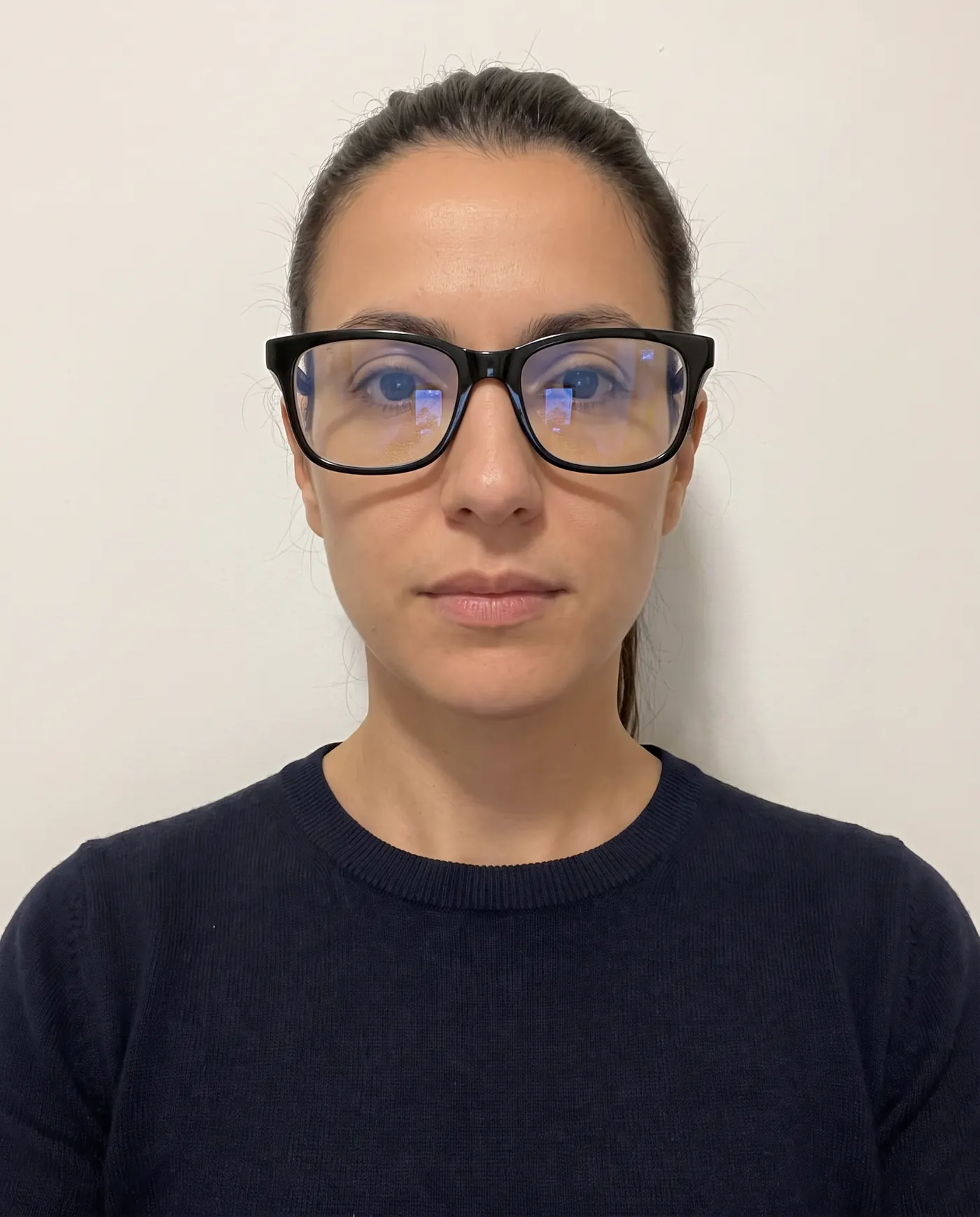 Rejected
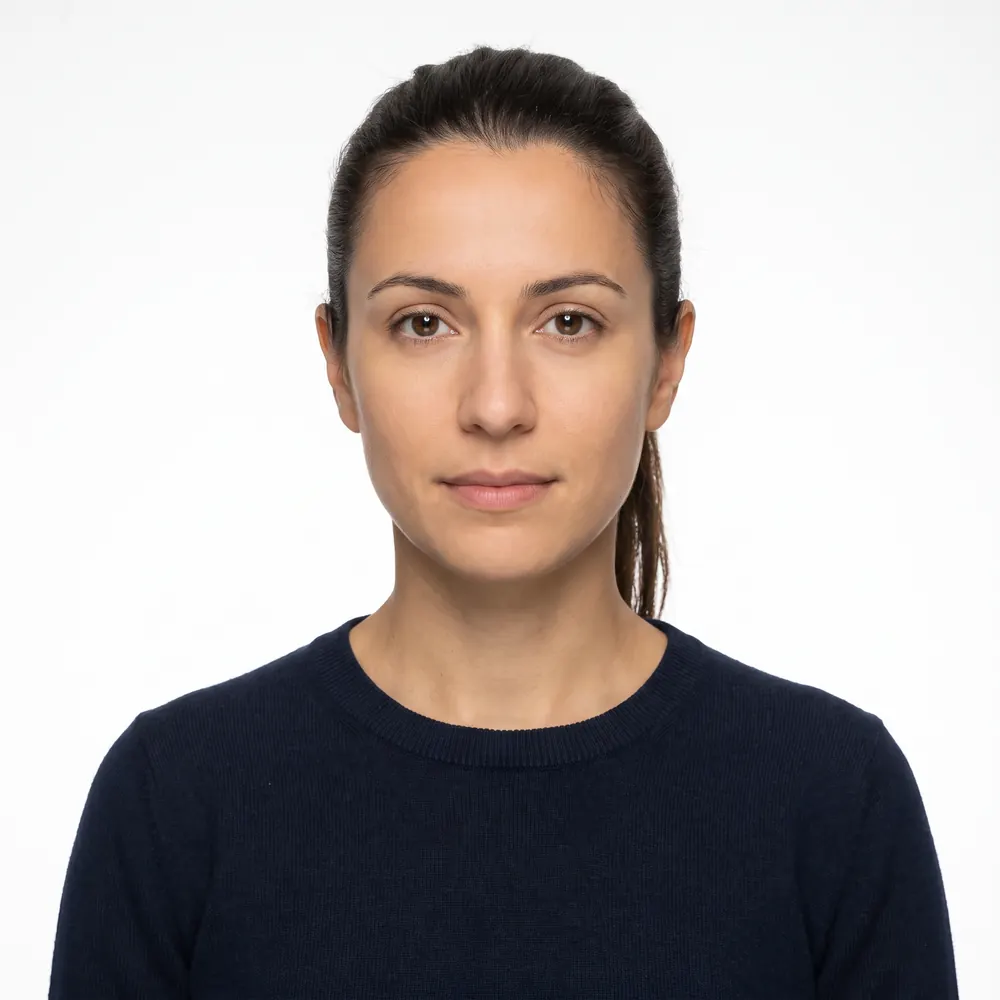 Accepted
Composition, clothing and accessories
The photo must be:
- In colour and in focus
- Taken within the last six months, reflecting your current appearance
- Taken in front of a plain white or off-white background
- Full-face view, directly facing the camera, neutral expression, both eyes open
- Taken in clothing you normally wear on a daily basis
- A hearing device, if you normally wear one
- Eyeglasses of any kind
- Headphones or wireless hands-free devices
- A uniform, unless it is religious clothing worn daily
- A hat or head covering that obscures your hair or hairline, unless worn daily for a religious purpose
- A scan of a driver's licence or other official document
- A snapshot, a magazine photo, a vending-machine photo or a full-length shot
Two of these are easy to get wrong without noticing. Headphones and earbuds are singled out, so take them out even if they look small in frame. And eyeglasses are a flat no — unlike the US passport rules, which allow a medical exception with a signed note, the DV instructions simply say do not wear them.
If you also have a US visa application in progress, the standards are the same family but the forms differ; our DS-160 photo requirements guide covers that upload, and DS-160 photo upload errors covers what to do when the form rejects a file.
Photographing a baby or toddler
The instructions give two tips, and they are genuinely practical:
- Lay the baby on their back on a plain white or off-white sheet. This supports the head and gives you the background at the same time. Watch for shadows on the face when shooting from above.
- Cover a car seat with a plain white or off-white sheet and photograph the child in the seat.
In both cases, no other person may appear in the photo, and the child should be looking at the camera with their eyes open. A parent's hand steadying a head is a visible person as far as the rule is concerned. Our DV lottery baby photo guide covers the newborn setups and edge cases in detail.
How to prepare each entry photo
- 1
Shoot against a real white or off-white wall
Stand about half a metre in front of it, in even daylight, with no shadow falling behind your head. Have someone else take the photo rather than using a front camera at arm's length.
- 2
Take one photo per person
Yourself, your spouse and every child listed on the entry, each photographed alone. Do not crop several people out of one frame.
- 3
Crop to a square
Height must equal width. Position the head so that chin to crown occupies about 60 percent of the frame height, with the eyes a little above the middle.
- 4
Export at 600 x 600 as JPEG
Check the file size is 240 kB or under. If it is over, lower the JPEG quality rather than shrinking the image below 600 pixels.
- 5
Have the files ready before you open the form
The photograph is submitted with the entry, at the same time. You cannot send it separately afterwards, and the form does not save a half-finished entry for you.
- 6
Keep the confirmation number
The confirmation page is the only way to check your status later. Print it and save it somewhere you will still have access to next year.
Dates, fees and the one thing we will not guess
The DV program runs on an annual cycle, and the registration window is short. We are deliberately not publishing dates we have not read on an official page: as of October 6, 2026 we could not confirm any DV-2027 dates (see the note at the top), and a stale date on a blog is worse than no date.
What we can tell you from the instructions we read:
- Entries are submitted electronically only, at dvprogram.state.gov, using the E-DV Entry Form (DS-5501). No late entries. No paper entries.
- Only one entry per person per registration period. The instructions state that submitting more than one entry for a person will disqualify all entries for that person.
- There is now a $1 entry fee. The DV-2026 instructions we read said there was no cost to submit the online entry form, but the Department of State's final rule of March 11, 2026 says all entrants must pay a $1 fee at the time of submitting their entry, with no waivers. It follows a $1 Diversity Visa registration fee announced in a September 16, 2025 fee rule, and the rule says the new passport requirement is being implemented with the DV-2027 program year. Any fee, passport requirement or wording change will be in that year's official instructions at dvprogram.state.gov, not in an email and not from an agent. Our DV lottery family photos guide covers how the rule affects a family entry.
- The Entrant Status Check on the E-DV website is the only way the Department of State notifies selectees. It does not send selection emails or mail letters.
Check the current year's registration dates and instructions at dvprogram.state.gov before you do anything else.
Where our tool fits, honestly
We are an independent photo tool. We are not affiliated with the Department of State, we have no connection to the DV program, we cannot submit an entry for you, and nothing anyone sells can improve your odds in a random draw. Anyone claiming otherwise is describing a scam, and the official instructions warn about exactly that.
What we do is the narrow, mechanical part: take a phone photo, crop it square, size the head to sit inside the 50-69% window, and export a JPEG at 600 x 600 pixels under 240 kB — one file per family member. Our DV lottery photo page is the short route to that check. We check tilt, background evenness, sharpness and exposure, and tell you what fails before you upload anything. We can't detect glasses, so take them off yourself. If a photo has already failed the upload or been refused, why DV lottery photos get rejected goes through the causes one by one. The check is free; you pay only when you download, $4.99 digital or $6.99 with a print sheet, with no subscription.
We do not retouch faces and we do not replace backgrounds on these files, because the instructions treat a manipulated photo as grounds for ineligibility. Photograph yourself against something white, and if you want the setup advice first, read how to take a passport photo at home before you start at the home page.
What accepted and rejected DV photos look like
The rules above resolve into a short list of real scenarios. These are the cases that decide an entry:
| Scenario | Verdict | Why |
|---|---|---|
| Plain white wall, head about 60% of the height, neutral expression, new photo | Accepted | Meets every published rule |
| Even daylight, but a shadow behind the head on the wall | Rejected | The background is no longer "plain white or off-white" |
| Clear prescription glasses, no glare | Rejected | The instructions say do not wear eyeglasses; the DV wording has no medical exception |
| A correctly sized photo taken eight months ago | Rejected | Outside the six-month window |
| The 600 x 600 file that passed last year's entry | Ineligible | Reusing a prior-year photo makes the entry ineligible, not just rejected |
| Sharp photo, but 4 MB and rectangular | Rejected | Not square, not 600 x 600, and over 240 kB |
| A PNG or HEIC file renamed to .jpg | Rejected | The file must be a real JPEG |
| Baby asleep on a white sheet, eyes closed | Rejected | The child must look at the camera with eyes open |
| A parent's hand steadying the baby's head | Rejected | No other person or support may appear in the photo |
| A face cropped out of a family group shot | Rejected | Individual photos only, and the head will almost always be too small |
| Background swapped to white in an app | Ineligible risk | Manipulation of any kind can make you ineligible |
For the same idea with real example photos, see our accepted vs rejected passport photo examples page. The failures it shows — shadows, glasses, a tilted head, a busy background — fail a DV entry too.
DV lottery photo checklist
- A brand-new photo, not last year's file
- One photo per person listed on the entry, each taken alone
- Taken within the last six months
- Colour, in focus, plain white or off-white background
- Neutral expression, facing the camera, both eyes open
- No eyeglasses, headphones or earbuds
- No hat or head covering unless worn daily for religious reasons
- Everyday clothing, no uniform
- Head 50-69% of the image height (about 300-414 px in a 600 px image)
- JPEG, 600 x 600 pixels, square, 240 kB or less
- No retouching, filters or background replacement
- All photos ready before you start the entry form
For the wider picture of how US photo rules compare with other countries, see our passport photo sizes by country table and our US passport photo requirements guide. And for how the DV entry sits alongside the DS-160, the DS-260 and the USCIS forms that no longer take your photo, see the US visa and immigration photo guide.
Sources
- U.S. Embassy in Cameroon - Instructions for the Diversity Immigrant Visa Program (DV-2026), including Submitting a Digital Photograph
- Federal Register / GovInfo - Visas: Enhancing Vetting and Combatting Fraud in the Diversity Immigrant Visa Program, final rule, 91 FR (March 11, 2026; re-read October 6, 2026)
- Federal Register - Diversity Visa Instructions for DV-2026 (published October 1, 2024; no DV-2027 instructions found on October 6, 2026)
- U.S. Embassy in Samoa - Beware of scams: DV-2027 has not started
- U.S. Embassy in Togo - Instructions for Diversity Visa Program
Frequently asked questions
What size photo does the DV lottery need?
The digital image must be a JPEG, 600 x 600 pixels, in a square aspect ratio, and 240 kB or smaller. If you scan an existing print instead, it must be a 2 x 2 inch (51 x 51 mm) photo scanned at 300 pixels per inch.
Can I reuse my photo from last year's DV entry?
No. The Department of State's instructions state that submitting the same photograph you submitted with a prior year's entry will make you ineligible for a Diversity Visa. Take a new photo for every entry period.
Does everyone in my family need their own DV lottery photo?
Yes. You need a recent photo of yourself, your spouse and every derivative child listed on the entry, each meeting the same specifications. Individual photos only; a family or group photo is not acceptable.
How recent does a DV lottery photo have to be?
Taken within the last six months, to reflect your current appearance. The instructions say not to submit a photograph older than six months, whether it is a new digital capture or a scan of a print.
Can I wear glasses in a DV lottery photo?
No. The instructions say plainly: do not wear eyeglasses. Headphones and wireless hands-free devices are also not acceptable. A hearing device you normally wear may be worn.
Can I edit or retouch a DV lottery photo?
No. A photograph that has been manipulated in any way may make you ineligible for a Diversity Visa. That includes filters, retouching and replacing the background. Crop and resize only.
Where do I find this year's DV registration dates?
In the Department of State's instructions for that program year, published at dvprogram.state.gov. As of October 6, 2026, we could not confirm any DV-2027 entry dates on an official page. The dates change every year and are the one thing you should never take from a third-party site, including this one.
The DV lottery specification, with the official source of each value: DV lottery photo: exact size and free check
Keep reading
 Requirements
 US Visa and Immigration Photos by Form: 2026 Guide
Which US visa and immigration forms need your photo in 2026: DS-160 uploads, DS-260 prints, DV entries, USCIS forms and biometrics, in one sourced table.
Read the guide Requirements
 DV Lottery Family Photos: Who Must Be on the Entry
DV lottery family photos: a separate photo for you, your spouse and every unmarried child under 21, who is exempt, and the omissions that void an entry.
Read the guide Troubleshooting
 DV Lottery Photo Rejected? 8 Causes and Fixes
Why a DV lottery photo gets rejected: the file checks, head size, glasses, edits and reused photos, and which mistakes can be fixed before you submit.
Read the guide How-to
 DV Lottery Photo for a Baby: Newborns on the Entry
A baby on a DV lottery entry needs their own photo: same 600x600 JPEG, eyes open, no hands in frame. The rules, the lying-down setup and the edge cases.
Read the guide Requirements
 N-400 Photo 2026: Do You Still Send Two Photos?
Most N-400 filers send no photos: USCIS takes a new one at biometrics. Who still mails two 2x2 prints, and the photo you need next for a first US passport.
Read the guide Requirements
 DS-260 Photo Requirements 2026: Two Prints, No Upload
DS-260 immigrant visa photos: two identical 2x2 inch color prints at the interview, head 1 to 1 3/8 in, no glasses. How it differs from DS-160 and USCIS.
Read the guide