Requirements
AI-Edited Passport Photos Get Rejected in 2026
The State Department says it checks photos for AI tools and will not accept edited or filtered images. What counts as an edit, and what is still allowed.

By Antoine Duno
Updated Published 8 min read
Specs verified on September 16, 2026 against the issuing authority
Every phone camera on the market now applies some form of computational retouching, and every photo app offers to "enhance" a portrait with one tap. For a passport or visa photo, both are the wrong button. The U.S. Department of State's guidance is that the photo you submit must be the original, unchanged one — and it says it checks photos to make sure applicants are not using artificial intelligence tools.
- Crop, rotate, resize
- Allowed
- Filters or beauty modes
- Not accepted
- Retouching / skin smoothing
- Not accepted
- AI generation or enhancement
- Not accepted
- Background replacement
- Not accepted
- Editing out red eye
- Not accepted
- Stretch or squash to fit
- Not accepted
- Automated screening
- State Dept. checks all photos
What the rule actually says
Three official pages say the same thing in three slightly different ways, and it is worth reading all three because between them they cover every case people ask about.
The Passport Photos page, under the heading "Digital changes", says to submit the original, unchanged photo, and: "Do not change your photo using computer software, phone apps or filters, or artificial intelligence."
The Uploading a Digital Photo page, which governs online renewal, says: "If your photo is unnaturally edited or filtered, we will not accept it. Do not use a photo you created or edited using artificial intelligence or other digital tools."
The visa side of the house, on both the Photo Requirements and Digital Image Requirements pages, phrases it as a prohibition on appearance: photos must not be digitally enhanced or altered to change your appearance in any way. Consular posts repeat it in their own words — the U.S. Embassy in Uzbekistan's required documents page states that only original photographs are acceptable and that photos altered in any way, including retouched ones, will not be accepted.
The four examples the Department publishes
The passport photo pages do not just state the rule; they show it. Four of the unacceptable examples are about editing, and each one closes a specific loophole.
"The background is cropped using a photo retouching tool, changing the outline of your head, face, and neck." This is the background-removal button in every photo app, and it is the single most common edit people attempt. It fails because it redraws the edge of your head.
"The image has been digitally changed to alter your natural appearance." Skin smoothing, eye brightening, jaw reshaping, teeth whitening. The photo tip attached to this example also warns not to stretch or compress an image to resize it.
"The image appears to be edited and is using filters that make it different than an original image." Including filters that were applied automatically by the camera.
"While the image may appear acceptable, it was created using an artificial intelligence tool based on the previous photo example. Take a new photo without making digital changes or enhancements." This is the important one. The Department is publishing an AI image that passes a human glance and telling you it is still unacceptable — which is why "but it looks fine" is not a defence.
Under those examples sits the photo tip that explains the enforcement: "We check all photos to ensure you are not using artificial intelligence tools."
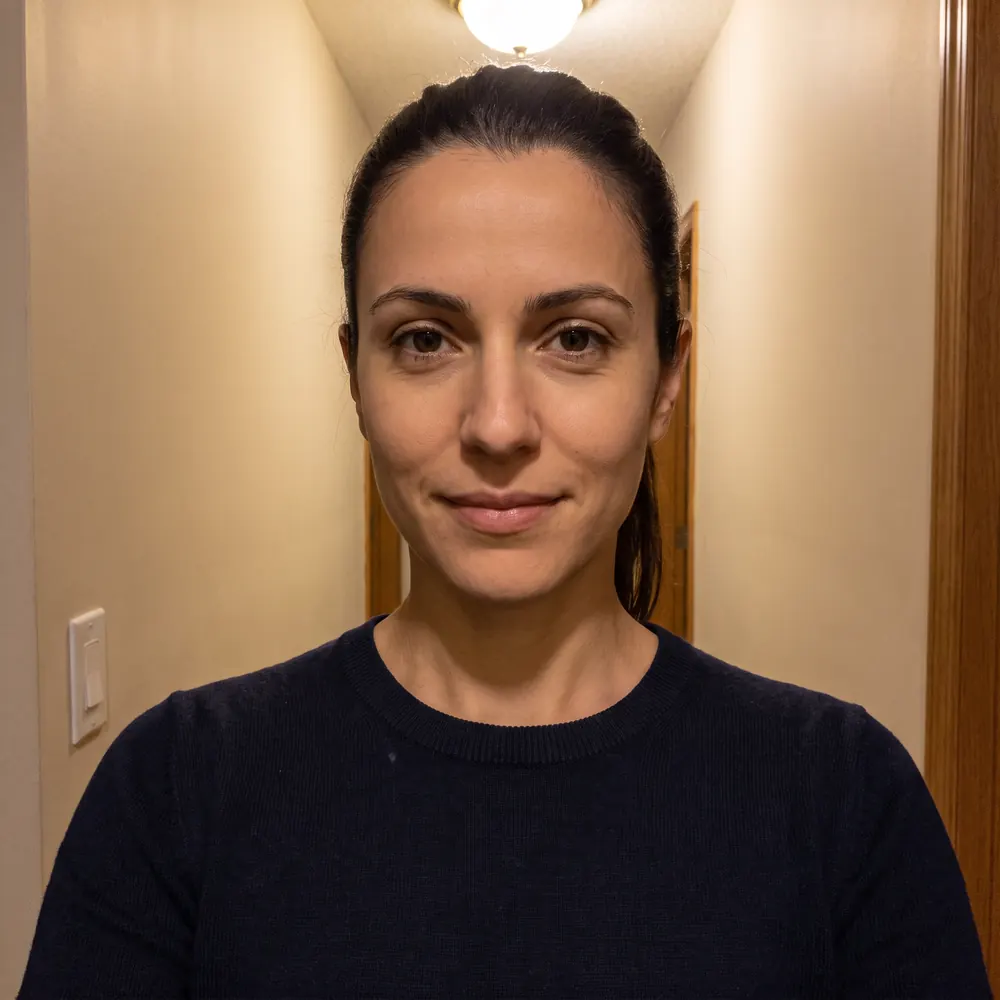 Rejected
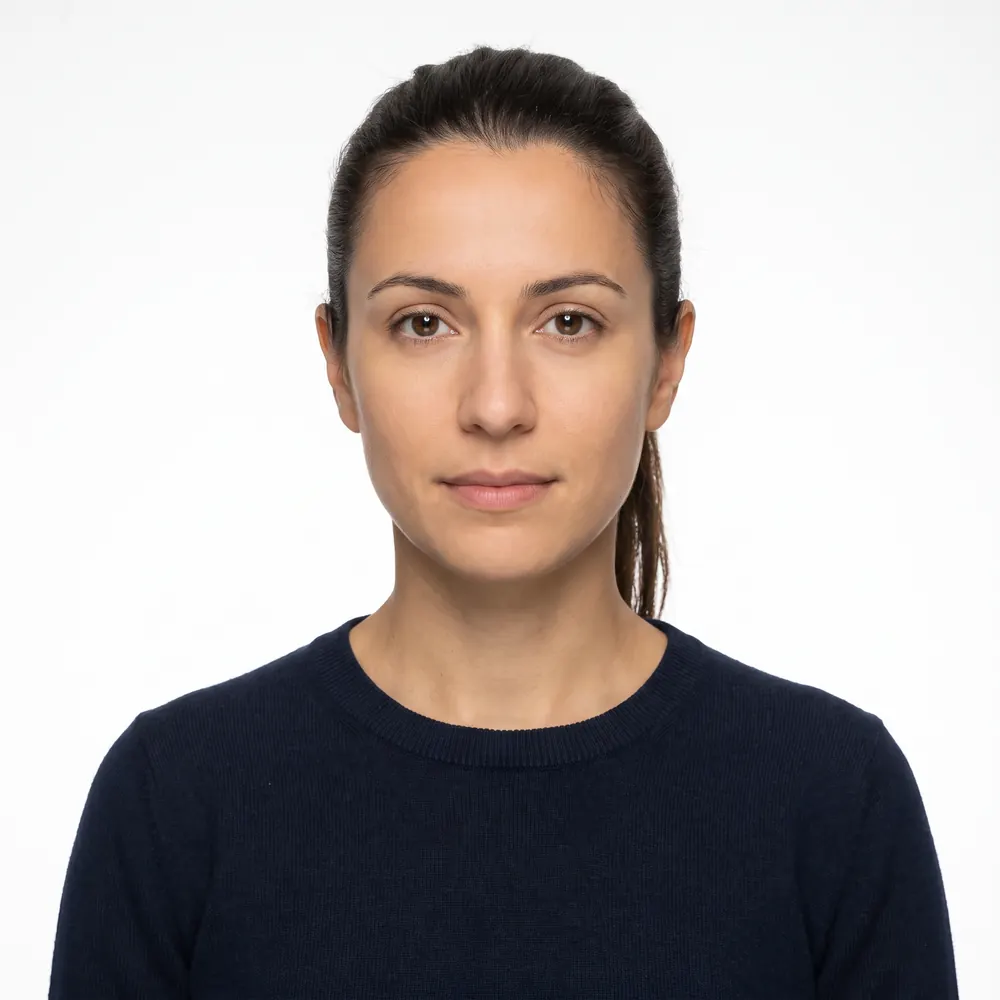 Accepted
Where the line sits
The rule is not "no software touched this file". It is that the photo's content and your appearance must be what the camera recorded.
Allowed, because the Department's own photo tool does exactly this: selecting a digital image, rotating it, resizing it, and cropping it to the required square. The online renewal application itself lets you reposition and crop your photo when you upload it.
Not allowed: anything that changes what is in the picture. Background replacement, blur, filters, retouching, generative fill, AI upscaling that invents detail, and "enhance" buttons whose behaviour you cannot inspect.
The awkward middle case is red eye. The guidance is consistent on both sides: if the photo has red eye, do not edit it out — take a new photo with natural lighting. For visa photos, the FAQ adds the precise distinction: it is acceptable to use the red-eye reduction option on your camera while taking the photo, but you may not use a photo editing tool to remove red eye afterwards.
- Crop to the required size and aspect ratio
- Rotate a sideways photo upright
- Resize proportionally to hit the pixel specification
- Use your camera's red-eye reduction while shooting
- Replace or whiten the background in software
- Smooth skin, slim the face, brighten eyes or whiten teeth
- Apply any filter, including one the camera applies by default
- Generate or 'enhance' the photo with an AI tool
- Stretch or squash the image to make it fit
- Edit red eye out after the fact
Why this rule exists, and why it is getting stricter
A passport photo is a biometric reference. It is the image a border officer compares to a face, and increasingly the image an automated gate compares against a live capture. Retouching that flatters you degrades exactly the features those comparisons rely on: the shape of the jaw, the distance between the eyes, the texture of the skin.
Generative tools make the problem worse in a specific way. They produce images that are locally plausible and globally wrong — a face that looks like you and matches nobody. The Department's published example of an acceptable-looking AI photo that is nonetheless unacceptable is the clearest statement of the concern.
There is also a fraud dimension, which is why the enforcement language is about detection rather than aesthetics.
What to do instead
- 1
Turn off every automatic enhancement
Beauty mode, skin smoothing, portrait filters, HDR effects that repaint skin. Shoot in the plainest photo mode your camera has.
- 2
Solve the background physically
A plain white or off-white wall, or a white sheet over a coloured one. Stand a couple of feet clear of it so your shadow falls behind you rather than onto it.
- 3
Solve the lighting physically
Face a window in daylight. Even light across the face, no overhead lamp casting shadows under your eyes and nose, no flash bouncing off your glasses — which are off anyway.
- 4
Have someone else take it
An arm's-length selfie distorts the features nearest the lens. A few feet back, camera at your eye level, is the whole trick.
- 5
Crop and size, and stop there
Square for a visa image, head and shoulders for passport renewal. Those two operations are all that is permitted, and all you need.
What we do with your photo, precisely
Since this article is about editing, it would be strange not to state our own position. We crop your photo to the required dimensions, size the head into the published band, and check head tilt, background evenness, sharpness and exposure. We don't repaint or replace the background on US photos: the replace-background switch in our tool exists only for the two Indian formats, and it is off by default. Where a photo needs more than a crop, we tell you to retake it rather than rebuild it, because a reconstructed head outline is one of the Department's own examples of an unacceptable photo. We also can't detect glasses, so that check stays with you.
You can try it on a photo and see the verdict before paying anything. We are an independent service and not affiliated with the U.S. Department of State or any government agency. Every rule on this page is theirs, every decision about a photo is theirs, and the pages linked below are the authority if anything changes.
For the rest of the specification, see US passport photo requirements and DS-160 photo requirements. If your photo has already been turned down, why passport photos get rejected covers the other nine reasons.
Frequently asked questions
Are AI-edited passport photos allowed?
No. The State Department's passport photo guidance says not to change your photo using computer software, phone apps or filters, or artificial intelligence, and its online renewal guidance says a photo created or edited with AI or other digital tools will not be accepted.
How would anyone know my photo was AI-edited?
The State Department states on its photo guidance that it checks all photos to make sure applicants are not using artificial intelligence tools. It also publishes an example of an AI-generated photo that looks acceptable at a glance and is still unacceptable.
Is cropping or resizing an edit?
No. Cropping, rotating and resizing to meet the size specification are exactly what the Department's own free photo tool does. What is prohibited is changing your appearance or the photo's content: filters, retouching, background replacement, AI enhancement.
Can I remove the background and replace it with white?
No. The Department publishes a photo whose background was cropped out with a retouching tool, changing the outline of the head, face and neck, as an unacceptable example. Its instruction for a poor background is to fix the lighting and take a new photo.
Can I remove red eye in an editing app?
No. For both passport and visa photos the guidance is to take a new photo rather than edit red eye out. You may use your camera's red-eye reduction setting while taking the photo; you may not use an editing tool afterwards.
What about beauty filters that are on by default?
Turn them off and retake the photo. Many phone cameras apply smoothing or "enhancement" automatically. A photo that has been unnaturally edited or filtered will not be accepted, whether or not you chose the filter deliberately.
Sources
- U.S. Department of State — Passport Photos (last updated March 24, 2026)
- U.S. Department of State — Uploading a Digital Photo (last updated May 04, 2026)
- U.S. Department of State — Visa Photo Requirements
- U.S. Department of State — Photo Frequently Asked Questions (red eye, retouching)
- U.S. Embassy in Uzbekistan — Required Documents
Keep reading
 Requirements
 Why Passport Photos Get Rejected: 10 Real Causes
The ten reasons passport and visa photos really get rejected, the official rule behind each and the fix, plus specs for print, renewal and the DS-160.
Read the guide Rules
Rules Hijab in a Passport Photo: Religious Covering Rules
Can you wear a hijab, turban or other religious head covering in a passport photo? The exact wording from the US, UK, Canada, Australia, Ireland and India.
Read the guide Rules
Rules Glasses in Passport Photos: Rules in 10 Countries
Can you wear glasses in a passport photo? Official rules for the US, UK, Ireland, Canada, Australia, NZ, India, France, Germany and Spain.
Read the guide Rules
Rules Can You Smile in a Passport Photo? Rules by Country
Can you smile in a passport photo? Official answers for the US, UK, Canada and Schengen visas, plus glasses, makeup, hair, head coverings and babies.
Read the guide Requirements
 Canada Visa Photo 2026: When IRCC Asks for One
Most Canada visitor visa applicants never send a photo: it's taken at biometrics. Who still needs two 35x45 mm prints, and the exact IRCC specifications.
Read the guide Requirements
 N-400 Photo 2026: Do You Still Send Two Photos?
Most N-400 filers send no photos: USCIS takes a new one at biometrics. Who still mails two 2x2 prints, and the photo you need next for a first US passport.
Read the guide