Requirements
DS-160 Photo Requirements 2026: Exact Specs
Every DS-160 photo spec with its source: 600x600 to 1200x1200 pixels, 240 kB JPEG, head at 50-69% of image height, no glasses. Checked 16 September 2026.
Making the photo now? US visa photo (DS-160): exact size and free check

By Antoine Duno
Updated Published 11 min read
Specs verified on September 16, 2026 against the issuing authority
The DS-160 has two photo specifications, and mixing them up is the most common reason an application stalls. The digital image you upload with the form is square and measured in pixels and percentages. The printed photo many consulates ask you to bring to the interview is 2 x 2 inches and measured in millimetres. Everything below is split along that line, with the source for each number.
- Aspect ratio
- Square (height = width)
- Minimum dimensions
- 600 x 600 px
- Maximum dimensions
- 1200 x 1200 px
- File format
- JPEG
- Maximum file size
- 240 kB
- Color
- 24 bits/px, sRGB
- Compression ratio
- 20:1 or less
- Head height
- 50–69% of image height
- Eye height
- 56–69% from bottom
- Age of photo
- Taken in the last 6 months
- Background
- Plain white or off-white
- Eyeglasses
- Not allowed
The digital image specification
These are the file rules the uploader enforces, from the State Department's Digital Image Requirements page.
Square, and nothing but square. Height must equal width. Every phone photo is rectangular, so a crop is always step one.
600 x 600 minimum, 1200 x 1200 maximum. Anything smaller is rejected outright; anything larger is out of range. Six hundred square is the safest target because it makes the file-size limit easy to hit.
JPEG only. The HEIC and HEIF files modern iPhones produce, and the PNG your screenshot tool makes, are not accepted. Convert before you upload.
240 kB or less. That is the hard ceiling, and it is small. For comparison, a single frame from a recent phone camera is commonly 3 to 6 MB.
24-bit color, sRGB. This is the default output of nearly every camera and phone, so you rarely have to do anything about it — but a black-and-white photo is not acceptable.
Compression ratio of 20:1 or less. The Department of State acknowledges you may need to compress to get under the size limit, and then caps how far you can go. Squeeze harder than that and the quality check flags the image; the State Department's own photo tool warns when overall image quality may be poor from low resolution, lack of clarity or over-compression.
If you want the arithmetic behind pixel sizes and print sizes, we cover it in passport photo size in pixels.
Head size and framing
This is where a technically valid file still fails. The photo composition template gives two proportions for digital images:
| Measurement | Digital image | Printed 2 x 2 photo |
|---|---|---|
| Head height (chin to top of head, including hair) | 50% to 69% of image height | 1 to 1 3/8 in (25–35 mm) |
| Eye height, measured from the bottom edge | 56% to 69% of image height | 1 1/8 to 1 3/8 in (28–35 mm) |
| Position | Head centered, full face toward camera | Head centered, full face toward camera |
The template also asks that the photo show the full head from the top of the hair to the bottom of the chin, with the head centered in the frame.
In practice, the failure mode is almost always a head that is too small. People stand back to get a clean background, then crop a square that contains a lot of room and a small face. Move the camera closer, or crop tighter.
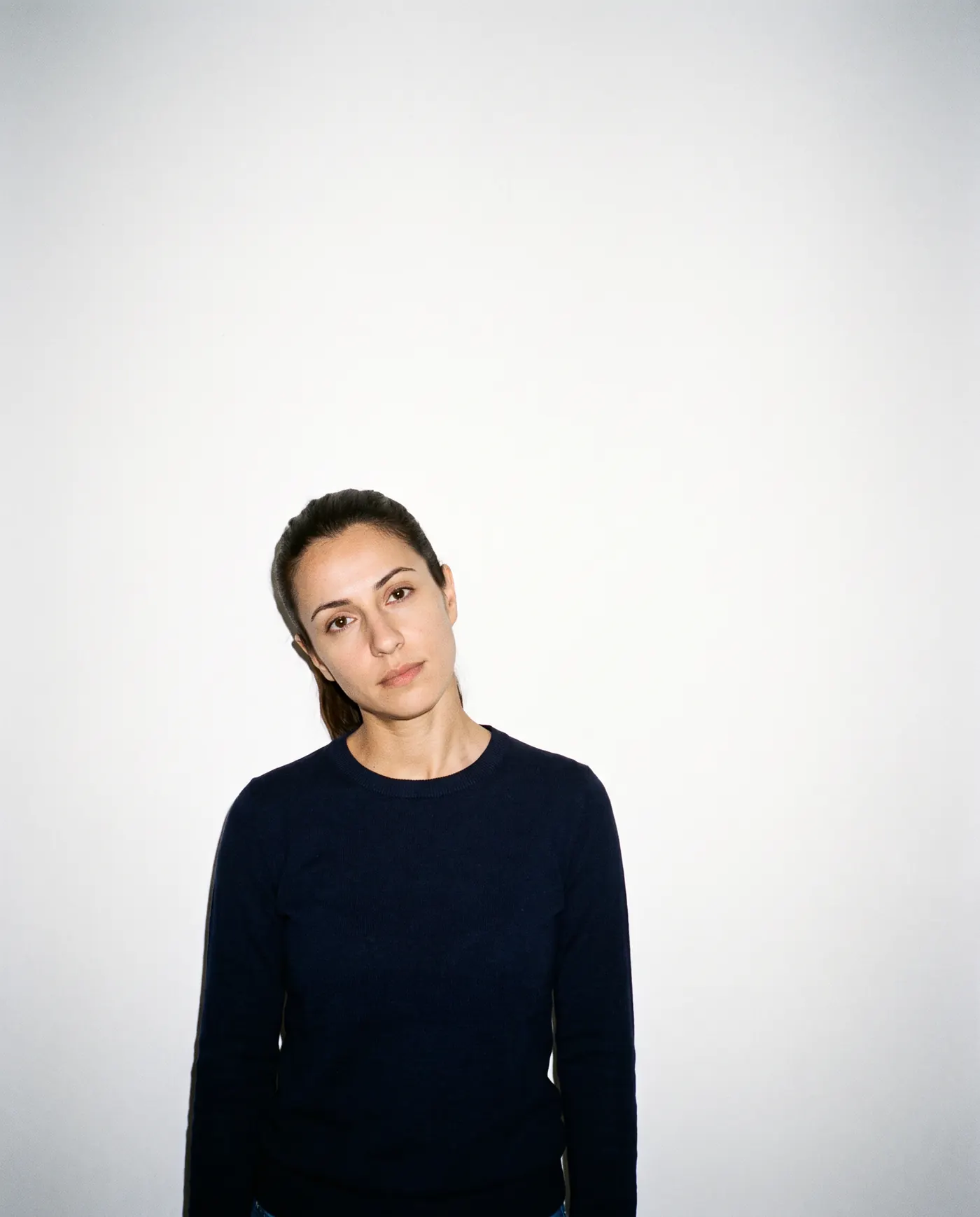 Rejected
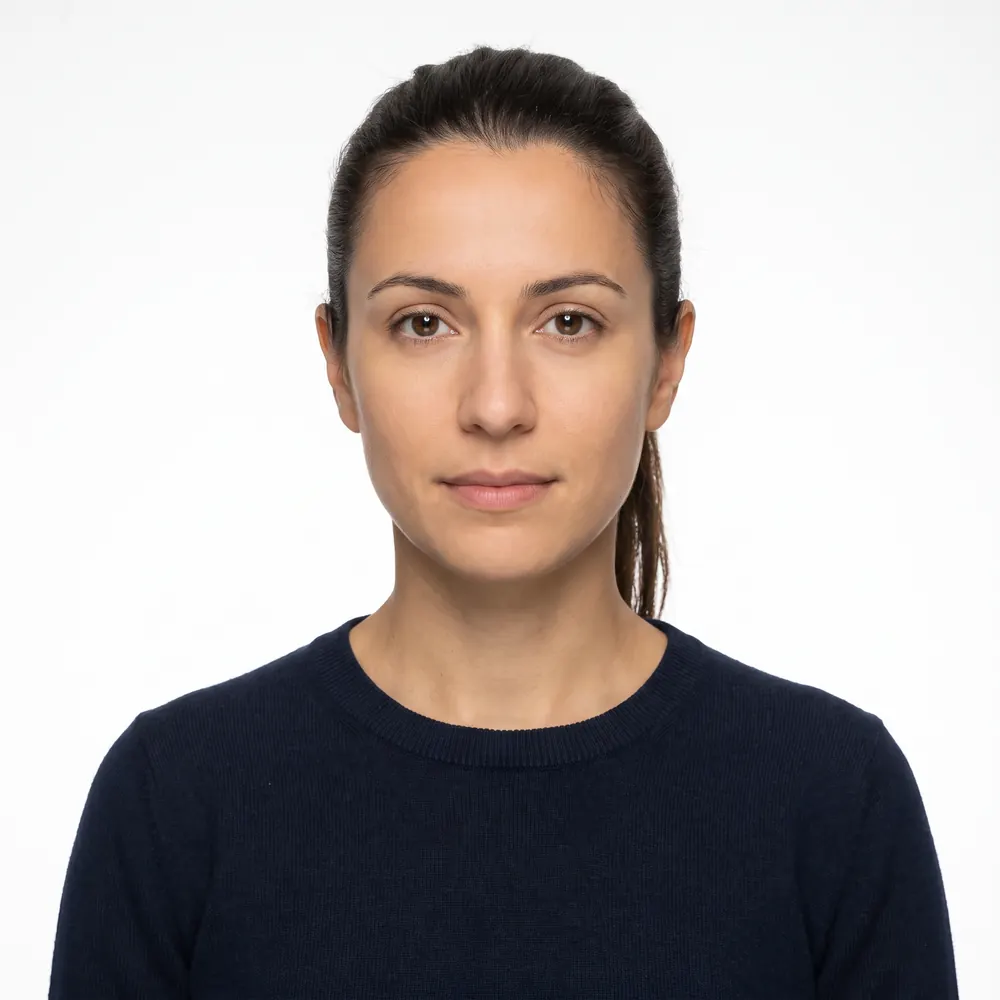 Accepted
Appearance rules
Every point below comes from the State Department's visa Photo Requirements page, mirrored by U.S. missions such as the U.S. Mission to Poland.
- In color, taken within the last 6 months, reflecting your current appearance
- Plain white or off-white background, no shadows, texture or objects
- Full-face view, directly facing the camera, head not tilted
- Neutral facial expression with both eyes open
- Clothing you normally wear day to day, no uniforms except daily religious dress
- Eyeglasses of any kind, including resting them on your head
- Hats or head coverings that obscure the hair or hairline, unless worn daily for religious reasons
- Headphones, earbuds or wireless hands-free devices
- Snapshots, magazine photos, vending-machine photos, low-quality mobile photos or full-length shots
- Photos copied or scanned from a driver's license or other official document
A few of these deserve more than a line.
Eyeglasses
The photo FAQ dates the rule precisely: effective November 1, 2016, eyeglasses are no longer allowed in new visa photos. The exception is narrow — a rare medical circumstance such as recent ocular surgery where the glasses protect the eyes — and it requires a signed statement from a medical professional. Even then, the frames must not cover the eyes and there must be no glare, shadow or refraction obscuring them.
Sunglasses and tinted lenses are never acceptable for a visa photo.
Expression
A neutral expression with both eyes open, looking straight at the camera. The photo FAQ adds that photos with unusual expressions or squinting will not be accepted. This is stricter than the US passport standard, which explicitly allows a closed-mouth smile — see can you smile in a passport photo for the difference.
Head coverings
You may wear one if it is worn daily for a religious purpose. Your full face must be visible and the covering must not cast shadows on your face. A hat worn for any other reason has to come off.
Hearing devices
If you normally wear a hearing device or similar article, you may wear it in the photo.
Children
A child's photo must show the child alone, looking at the camera with eyes open. Nothing supporting the child may appear in the frame, including a parent's arms or hands. The State Department's own suggestion is to lay a baby on a plain white or off-white sheet, or to cover a car seat with one, and to watch for shadows on the face when shooting from above. Unlike the US passport rule, which tolerates a baby's eyes not being entirely open, the visa FAQ asks for the child's eyes to be open and looking toward the camera.
No edits, no enhancement, no AI
Photos must not be digitally enhanced or altered to change your appearance in any way. That sentence appears on both the visa photo requirements page and the digital image requirements page, and consular posts repeat it: the U.S. Embassy in Uzbekistan's required documents page states that photos altered in any way — copied, digitally scanned, retouched — will not be accepted.
The FAQ closes a loophole people reach for: you may use your camera's red-eye reduction when taking the photo, but you may not remove red eye with an editing tool afterwards.
What remains allowed is exactly what the Department of State's own photo tool does — select an image, rotate it, resize it and crop it to a square of 600 x 600 pixels. The tool's page notes it is intended for cropping only and that a State Department employee makes the final decision on whether a photo is acceptable.
Retouching apps, background replacement and generative "enhance" features are a different category entirely. We cover where the line sits in AI-edited passport photos.
- 1
Shoot against a plain wall in daylight
Plain white or off-white, a couple of feet behind you so your shadow falls out of frame. Camera at eye level, a few feet away. Glasses off, neutral expression, both eyes open.
- 2
Crop to a square
Center your head horizontally, with the top of your hair near the top edge and your chin above the midline, so head height lands in the 50 to 69 percent band.
- 3
Export a JPEG at 600 x 600
The minimum accepted size and the easiest way to stay under 240 kB without compressing so hard that the quality check complains.
- 4
Upload it inside the DS-160
The form will run its automated check. If the photo appears on your confirmation page, the upload succeeded.
- 5
Print one 2 x 2 for the interview
Check your embassy or consulate's instructions. Several posts require a printed photo, and others recommend one even when the upload worked.
The printed photo you take to the interview
Immigrant visa applicants using Form DS-260 must provide two identical photos at the interview. Diversity Visa selectees must also bring two. Nonimmigrant applicants using the DS-160 upload a digital image, but some posts require one printed photo at the appointment, and the U.S. Mission to Poland recommends bringing one regardless. What to expect when the officer looks at the photo is in our US visa interview photo guide.
The print spec:
| Property | Requirement |
|---|---|
| Size | 2 x 2 inches (51 x 51 mm) |
| Paper | Photo-quality paper, matte or glossy |
| Color | Color only — black and white is not accepted |
| Head height | 1 to 1 3/8 in (25–35 mm), chin to top of head |
| Eye height | 1 1/8 to 1 3/8 in (28–35 mm) from the bottom edge |
If you are scanning an existing print rather than shooting new, the photo must be 2 x 2 inches and scanned at 300 pixels per inch (12 pixels per millimetre).
System approval is not visa approval
The most useful sentence on any of these pages is the one the U.S. Mission to Poland prints in bold: approval of your photo by the system during the DS-160 application does not guarantee that the post can use that photo for a visa if it does not meet the requirements. The digital image requirements page says the same thing from the other direction — acceptance of your photo is always at the discretion of the U.S. embassy or consulate where you apply.
Treat the uploader as a spell-checker, not an examiner. If your photo passes but has a shadow on the wall, you will hear about it at the window.
Quick checklist
You can work through this by eye, or upload the photo and have it measured for you — the check is free and you only pay if you download the file.
- Square JPEG, 600 x 600 to 1200 x 1200 pixels
- 240 kB or smaller, 24-bit color, sRGB
- Head 50% to 69% of image height, eyes 56% to 69% from the bottom
- Taken in the last 6 months, current appearance
- Plain white or off-white background, no shadows
- Full-face view, head not tilted, neutral expression, eyes open
- No glasses, no hat (unless daily religious dress), no headphones
- No filters, retouching, background replacement or AI enhancement
- One printed 2 x 2 photo ready for the interview
Scanning a photo you already have
If you have a compliant print and no way to reshoot, you can scan it, but two extra rules apply on top of the digital image specification. The print itself must be 2 x 2 inches (51 x 51 mm), and it must be scanned at 300 pixels per inch (12 pixels per millimetre). At that resolution a 2-inch square scans to 600 pixels square, which is exactly the minimum the uploader accepts — which is why the number is what it is.
What you cannot do is photograph a print with your phone, or scan a photo out of another document. Copied or digitally scanned photos of official documents are not accepted, and the quality loss is visible to the reviewer even when the file passes the automatic check.
Where DS-160 photos go wrong most often
Having read the specification, it is worth knowing which parts of it actually catch people.
The file, not the face. Rectangular, too large, and in HEIC — three properties of a default iPhone photo, all three of them disqualifying. Most first-attempt failures never reach the photographic checks at all.
The head is too small. People stand back to keep the wall clean, then crop a square with a lot of air in it. Fifty percent of the image height is a bigger head than it sounds.
The background is white but not plain. A shadow, a skirting board, a door edge, a hint of texture in the paint under raking light. Move away from the wall and the light stops describing it.
Glasses. Still the most common single rule people are surprised by, nine years after it changed.
The camera. The State Department's photo FAQ says you can use a digital camera, and adds: "Most webcams and mobile phones cannot provide images of sufficient quality." It also lists low-quality mobile phone photos among those that are not acceptable, and recommends a professional visa photo service. You may take the photo yourself, so a sharp, evenly lit original from a good phone camera is allowed, but a soft webcam frame or a heavily compressed selfie is a real risk. The embassy or consulate decides.
The photo is a year old. Six months, every time, for every application.
Frequently asked questions
What are the DS-160 photo size requirements?
The digital image must be square, at least 600 x 600 pixels and at most 1200 x 1200 pixels, in JPEG format, 240 kB or smaller, in 24-bit color in the sRGB color space. If you print a photo instead, it must be exactly 2 x 2 inches (51 x 51 mm).
How big should my head be in a DS-160 photo?
In a digital image, your head must be between 50% and 69% of the total image height from the bottom of the chin to the top of the head, and your eye line between 56% and 69% of the height measured from the bottom of the image.
Can I wear glasses in a DS-160 photo?
No. Eyeglasses have not been allowed in new visa photos since November 1, 2016. The only exception is a rare medical case, such as recent ocular surgery, and it requires a signed statement from a medical professional.
How recent does a DS-160 photo have to be?
It must have been taken within the last 6 months and reflect your current appearance. If it does not look like you now, the embassy or consulate will ask for a new photo even when the photo is less than six months old.
Can I smile in a DS-160 photo?
No. The visa photo rules ask for a neutral facial expression with both eyes open, directly facing the camera. The photo FAQ adds that photos with unusual expressions or squinting will not be accepted. This is stricter than the US passport rule, which allows a closed-mouth smile.
Do I still need a printed photo if the upload works?
Often, yes. Some posts require applicants to bring one photo to the interview, and the U.S. Mission to Poland recommends it outright. System approval during the DS-160 does not guarantee the photo can be used for the visa.
Sources
- U.S. Department of State — Visa Photo Requirements
- U.S. Department of State — Digital Image Requirements
- U.S. Department of State — Photo Composition Template
- U.S. Department of State — Photo Frequently Asked Questions
- U.S. Mission Poland — Visa Photo Requirements
- U.S. Embassy in Uzbekistan — Required Documents
- U.S. Department of State — Photo Tool
The US visa (DS-160) specification, with the official source of each value: US visa photo (DS-160): exact size and free check
Keep reading
 Requirements
 US Visa and Immigration Photos by Form: 2026 Guide
Which US visa and immigration forms need your photo in 2026: DS-160 uploads, DS-260 prints, DV entries, USCIS forms and biometrics, in one sourced table.
Read the guide Troubleshooting
 DS-160 Photo Upload Error? Fix It in 2 Minutes
Every DS-160 photo upload error explained: what the CEAC check rejects, the exact file specs, and how to make a photo that passes. Pay only at download.
Read the guide Requirements
 DS-160 Photo for a Child: Rules for Kids and Infants
DS-160 photo rules for children and babies: same 600x600 to 1200x1200 JPEG, eyes open even for newborns, no hands in frame, one photo per child. Sourced.
Read the guide Requirements
 N-400 Photo 2026: Do You Still Send Two Photos?
Most N-400 filers send no photos: USCIS takes a new one at biometrics. Who still mails two 2x2 prints, and the photo you need next for a first US passport.
Read the guide Requirements
 DS-260 Photo Requirements 2026: Two Prints, No Upload
DS-260 immigrant visa photos: two identical 2x2 inch color prints at the interview, head 1 to 1 3/8 in, no glasses. How it differs from DS-160 and USCIS.
Read the guide Requirements
 ESTA Photo 2026: Passport Scan and the Selfie Rule
The photos an ESTA application asks for in 2026: the passport page upload, the website's selfie rules, the app's live selfie and CBP's pending changes.
Read the guide