Troubleshooting
DS-160 Photo Upload Error? Fix It in 2 Minutes
Every DS-160 photo upload error explained: what the CEAC check rejects, the exact file specs, and how to make a photo that passes. Pay only at download.
Making the photo now? US visa photo (DS-160): exact size and free check

By Antoine Duno
Updated Published 10 min read
The Consular Electronic Application Center will not let you finish the DS-160 until your photo clears its check, and the error it shows rarely explains what is actually wrong. In most cases the problem is not your face: it is that the file coming off your phone is rectangular, several megabytes in size, and in a format the uploader will not take.
The fix is mechanical. Get the file into the shape the Department of State asks for, then re-check the handful of photographic rules the automated test looks at.
The two gates your photo has to pass
The upload runs two checks in sequence, and knowing which one stopped you saves a lot of guessing.
Gate one is the file. Dimensions, aspect ratio, format and byte size, per the State Department's Digital Image Requirements:
| Property | Requirement |
|---|---|
| Aspect ratio | Square — height must equal width |
| Minimum dimensions | 600 x 600 pixels |
| Maximum dimensions | 1200 x 1200 pixels |
| Format | JPEG |
| File size | Less than or equal to 240 kB |
| Color | 24 bits per pixel, sRGB color space |
| Compression | Compression ratio of 20:1 or less |
Gate two is the photograph itself: an automated check that looks at framing, head size, background, lighting and whether your eyes are visible. This is the one people find opaque, because it can pass a photo a consular officer later rejects, and it can fail a photo that looks perfectly fine to you.
Every DS-160 photo error, and what it actually means
"The image is not square" or the upload is refused before anything is processed
Your phone shot is 4:3 or 3:4. Nothing about your photo is wrong; the frame is. Crop it to a square first. The Department of State runs a free photo tool that crops an image to exactly 600 x 600 pixels, and it states plainly that it is intended for cropping only.
"Minimum photo dimensions are 600x600"
That is the literal message the Department of State's photo tool shows when the source file is too small. It happens when you crop a small screenshot, pull a photo out of a messaging app, or use an image that was already resized down. Go back to the original camera file, which is almost always large enough, and crop from that.
"Please choose a JPEG image"
PNG, HEIC and HEIF files are what modern phones save by default, and the DS-160 does not accept them. Re-save as JPEG. Note that the U.S. passport online renewal system does accept PNG, HEIC and HEIF — the visa form does not. Two different systems, two different rules.
The file is over 240 kB
A 12-megapixel photo is typically 3 to 6 MB, more than ten times the limit. Resizing to 600 x 600 usually solves it on its own. If the file is still too large, save the JPEG at a lower quality setting — but keep the compression ratio at 20:1 or below, because the State Department's own tool warns when the result is "[o]verall image quality may be poor (low resolution, lack of clarity, or overly compressed)".
"Automatic Crop is unable to successfully crop your photo"
The face detector could not find or place your face. This is what happens when the photo is taken at an angle, your head is tilted, the lighting is heavily uneven, or your face is small in the frame. The tool's own advice is to "[c]hoose a new photo or try to manually crop the photo". Retake it square-on to the camera, with the camera at eye level, a few feet away.
The automated check warns that your photo may be non-compliant
The State Department photo tool's wording for this is "Automated check indicates photo may be non-compliant. Consider choosing a different photo to prevent possible delays." It is a warning, not a hard stop — and it is worth taking seriously, because the consular officer applies the same rules with better eyes.
Head size errors
The digital rule is proportional, not in millimetres: your head must be between 50% and 69% of the image height, and your eye line between 56% and 69% of the height measured from the bottom, per the State Department's photo composition template. Most failures are heads that are too small, because people shoot from too far away and then crop to a square that includes half the room.
Background errors
Plain white or off-white, no shadow, no texture, no objects. A cream wall is fine. A shadow cast on that wall by your own body is not. Step at least a couple of feet away from the wall and the shadow falls behind you, out of frame.
Glasses
Eyeglasses have not been allowed in new visa photos since November 1, 2016, and the rule is absolute except for rare documented medical cases that require a signed statement from a health practitioner. Take them off — and do not rest them on your head.
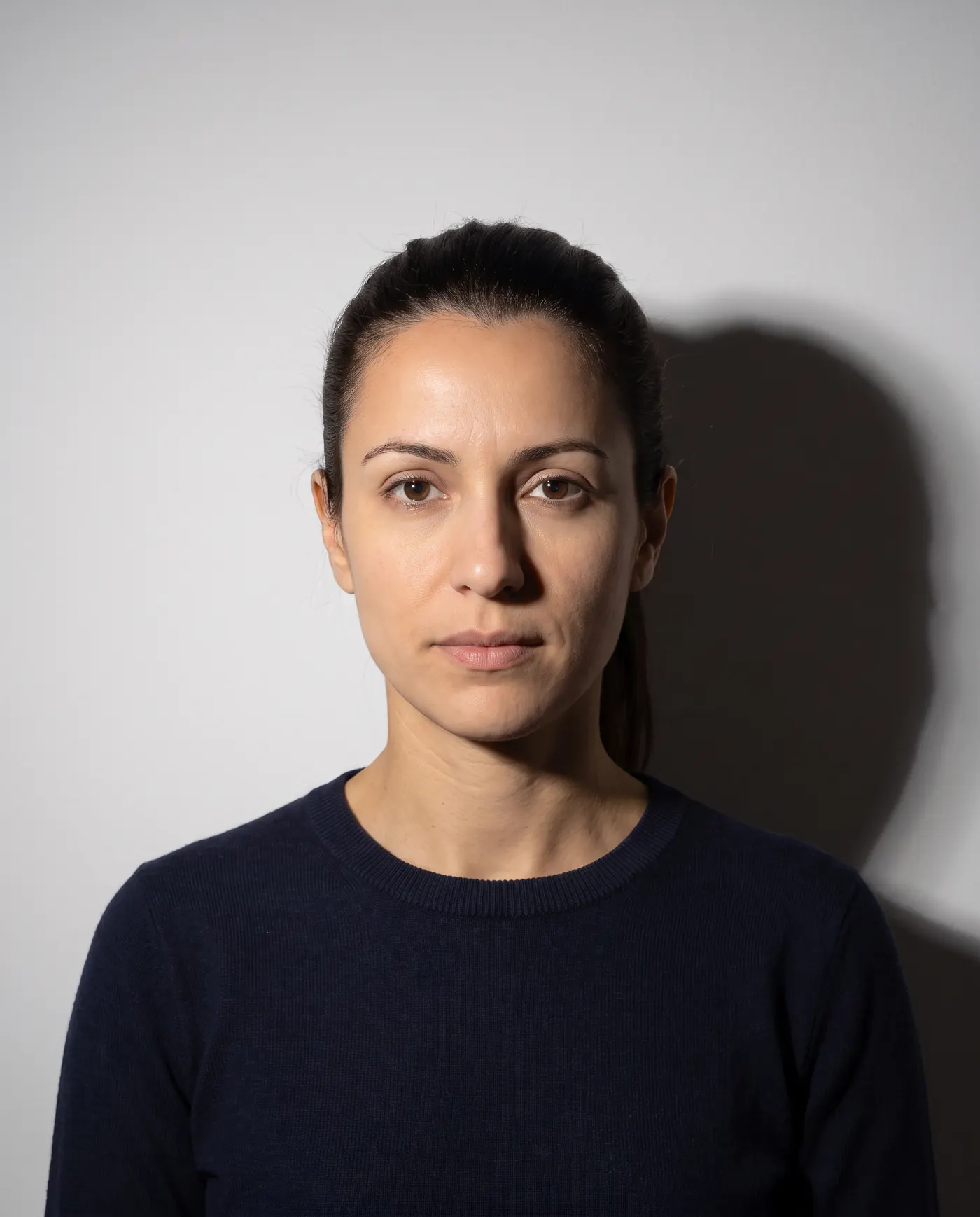 Rejected
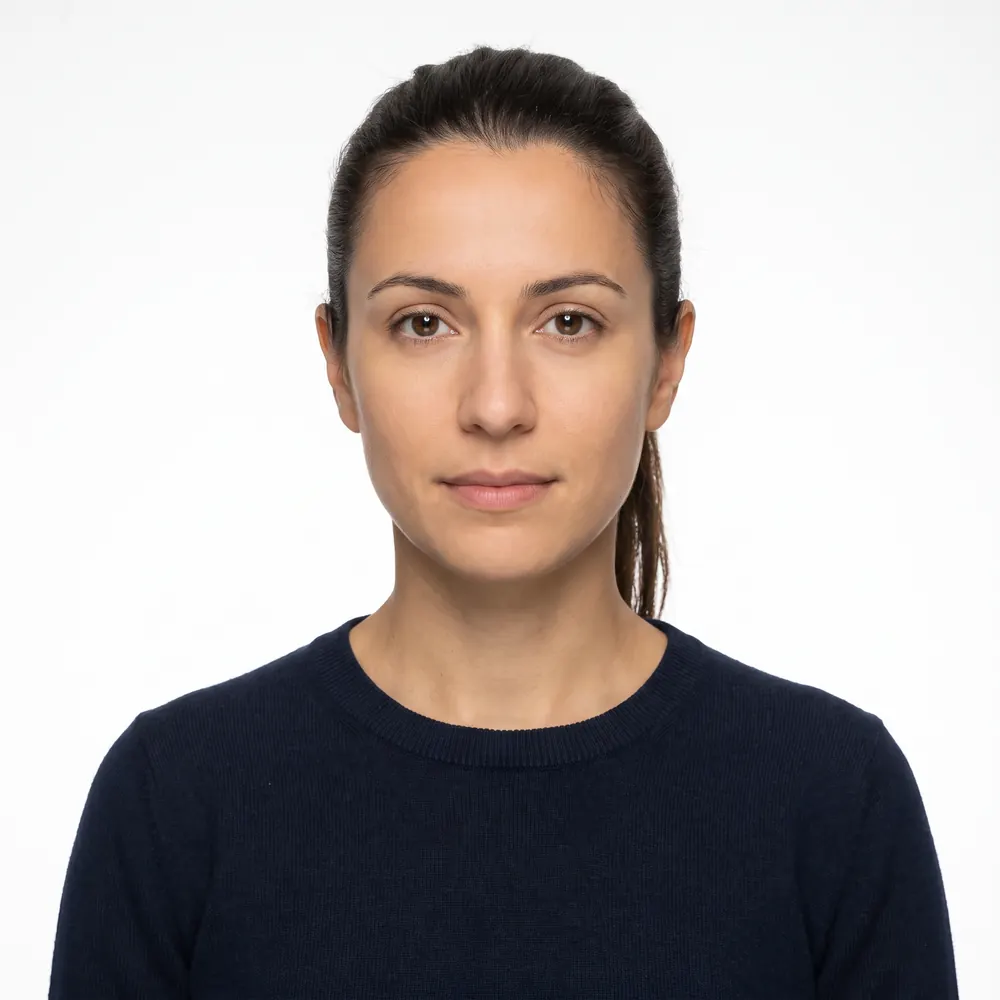 Accepted
Fix it in 2 minutes
- 1
Start from the original camera file
Not a screenshot, not a copy from a chat app, not a scan of a print. Compression and resizing have already happened to those, and you cannot get the quality back.
- 2
Reshoot if the framing is wrong
Camera at eye level, a few feet away, face square to the lens, plain white or off-white wall a couple of feet behind you, even light from a window. Glasses off, hat off, neutral expression, both eyes open.
- 3
Crop to a square with your head at the right height
Aim for the top of your head near the top of the frame and your chin a little above the halfway line, so head height lands inside the 50 to 69 percent band.
- 4
Export as a JPEG at 600 x 600
Six hundred square is the smallest accepted size and the easiest way to land under 240 kB. Anything up to 1200 x 1200 is allowed if the file stays within the size limit.
- 5
Upload, then look at the confirmation page
If your photo appears on the DS-160 confirmation page, the upload worked. If there is an X in its place, it failed.
The X on the confirmation page
If the confirmation page shows an X where your photo should be, the State Department's photo FAQ is explicit about what to do: the upload failed, so submit one printed photo meeting the requirements along with your DS-160 confirmation page to the embassy or consulate where you will apply, and contact that post for its specific instructions. If the confirmation page shows your photo, the upload succeeded and no separate print is required.
That printed photo follows the paper spec, not the digital one: 2 x 2 inches (51 x 51 mm), head 1 inch to 1 3/8 inches from the bottom of the chin to the top of the head, on photo-quality paper.
Passing the check is not approval
This is the part most guides leave out. The U.S. Mission to Poland's visa photo requirements page puts it in bold: approval of your photo by the system during the DS-160 application does not guarantee that the post can use that photo for a visa if it does not meet the requirements. The same page recommends bringing one compliant photo to the interview.
Other posts say the same thing in their own words. The U.S. Embassy in Uzbekistan's required documents page recommends bringing a photo to the interview even if the photo upload was successful, and notes that photos altered in any way — copied, digitally scanned, retouched — will not be accepted.
Still failing? The less obvious causes
- The file is a screenshot or a photo of a printed photo — resolution and quality are already gone
- The image was sent through a messaging app, which recompressed it on the way
- A PNG was renamed to .jpg — the extension changed, the actual format did not
- Heavy JPEG compression pushed the file past a 20:1 ratio to squeeze under 240 kB
- The photo is older than 6 months, or no longer reflects your current appearance
- Hair, a scarf or a head covering crosses part of the face, or casts a shadow on it
- Cropped square from the original camera file, exported as JPEG at 600 x 600
- Plain white or off-white wall, subject standing a couple of feet clear of it
- Even, natural light on the face, no glasses, neutral expression, both eyes open
A warning the upload screen never gives: the State Department's photo FAQ says "Most webcams and mobile phones cannot provide images of sufficient quality," and lists low-quality mobile phone photos among those that are not acceptable. A file can pass the size and shape check and still be judged too soft by the person who reviews it. Use the rear camera, good daylight and the original file, not a screenshot or a messaging-app copy.
One more trap worth naming: do not try to fix a bad photo in software. The visa rules say photos must not be digitally enhanced or altered to change your appearance in any way, and the passport side of the Department of State now says it checks photos to make sure applicants are not using artificial intelligence tools. Background replacement, skin smoothing and "enhance" buttons all fall on the wrong side of that line. Read why AI-edited photos get rejected before you touch an editor.
What to do next
If you want the full specification rather than the error-by-error fix, read our DS-160 photo requirements guide, which lays out every measurement with its source. If you are also renewing a US passport, note that the numbers are different: see US passport photo requirements and, for the digital side of it, passport photo size in pixels.
And if the shot itself is the problem rather than the file, how to take a passport photo at home covers the lighting and distance that make the automated check pass on the first try. When you have a shot you are happy with, run it through the checker before you go back to the DS-160 — checking costs nothing and only the download is paid.
Frequently asked questions
Why does my DS-160 photo upload keep failing?
Almost always the file, not your face. The Department of State requires a square JPEG, at least 600 x 600 and no more than 1200 x 1200 pixels, 240 kB or smaller. A phone photo is rectangular and several megabytes, so it fails before the quality check ever runs.
What does the X on my DS-160 confirmation page mean?
It means the photo upload failed. The State Department's photo FAQ says to bring one printed photo that meets the requirements, along with your DS-160 confirmation page, to the embassy or consulate. Contact that post for its specific instructions.
What size photo does the DS-160 need?
A square image, minimum 600 x 600 pixels and maximum 1200 x 1200 pixels, in JPEG format, 240 kB or smaller, in 24-bit color. Your head must fill 50 to 69 percent of the image height from the bottom of the chin to the top of the head.
Does passing the DS-160 photo check mean my photo is approved?
No. The U.S. Mission to Poland states that approval of your photo by the system during the DS-160 application does not guarantee the photo can be used for a visa. Consular officers make the final call, and many posts ask you to bring a printed photo to the interview.
Can I submit the DS-160 without a photo?
Yes. If the upload fails you can continue and submit the form. The State Department then asks you to take one printed photo that meets the requirements to your appointment along with the confirmation page. Check your post's instructions first.
Can I use a photo I edited or enhanced?
No. The visa photo rules say photos must not be digitally enhanced or altered to change your appearance in any way, and photos altered in any way, including retouched ones, are not accepted. Cropping and resizing to meet the file specs are fine.
Sources
- U.S. Department of State — Digital Image Requirements (visa photos)
- U.S. Department of State — Photo Frequently Asked Questions (photo upload failure)
- U.S. Department of State — DS-160 Frequently Asked Questions
- U.S. Department of State — Photo Composition Template
- U.S. Department of State — Photo Tool (error messages quoted above)
- U.S. Mission Poland — Visa Photo Requirements
- U.S. Embassy in Uzbekistan — Required Documents
The US visa (DS-160) specification, with the official source of each value: US visa photo (DS-160): exact size and free check
Keep reading
 Requirements
 DS-160 Photo Requirements 2026: Exact Specs
Every DS-160 photo spec with its source: 600x600 to 1200x1200 pixels, 240 kB JPEG, head at 50-69% of image height, no glasses. Checked 16 September 2026.
Read the guide Requirements
 US Visa and Immigration Photos by Form: 2026 Guide
Which US visa and immigration forms need your photo in 2026: DS-160 uploads, DS-260 prints, DV entries, USCIS forms and biometrics, in one sourced table.
Read the guide Specs
Specs Passport Photo File Size: Get Under Any KB Limit
KB limits for the US visa, DV, US renewal, UK, Canada, Ireland, India visa and OCI portals, and how to hit them without a blurry photo. Pay at download.
Read the guide Requirements
 N-400 Photo 2026: Do You Still Send Two Photos?
Most N-400 filers send no photos: USCIS takes a new one at biometrics. Who still mails two 2x2 prints, and the photo you need next for a first US passport.
Read the guide Requirements
 DS-260 Photo Requirements 2026: Two Prints, No Upload
DS-260 immigrant visa photos: two identical 2x2 inch color prints at the interview, head 1 to 1 3/8 in, no glasses. How it differs from DS-160 and USCIS.
Read the guide Requirements
 ESTA Photo 2026: Passport Scan and the Selfie Rule
The photos an ESTA application asks for in 2026: the passport page upload, the website's selfie rules, the app's live selfie and CBP's pending changes.
Read the guide