Troubleshooting
DV Lottery Photo Rejected? 8 Causes and Fixes
Why a DV lottery photo gets rejected: the file checks, head size, glasses, edits and reused photos, and which mistakes can be fixed before you submit.
Making the photo now? DV lottery photo: exact size and free check

By Antoine Duno
Updated Published 10 min read
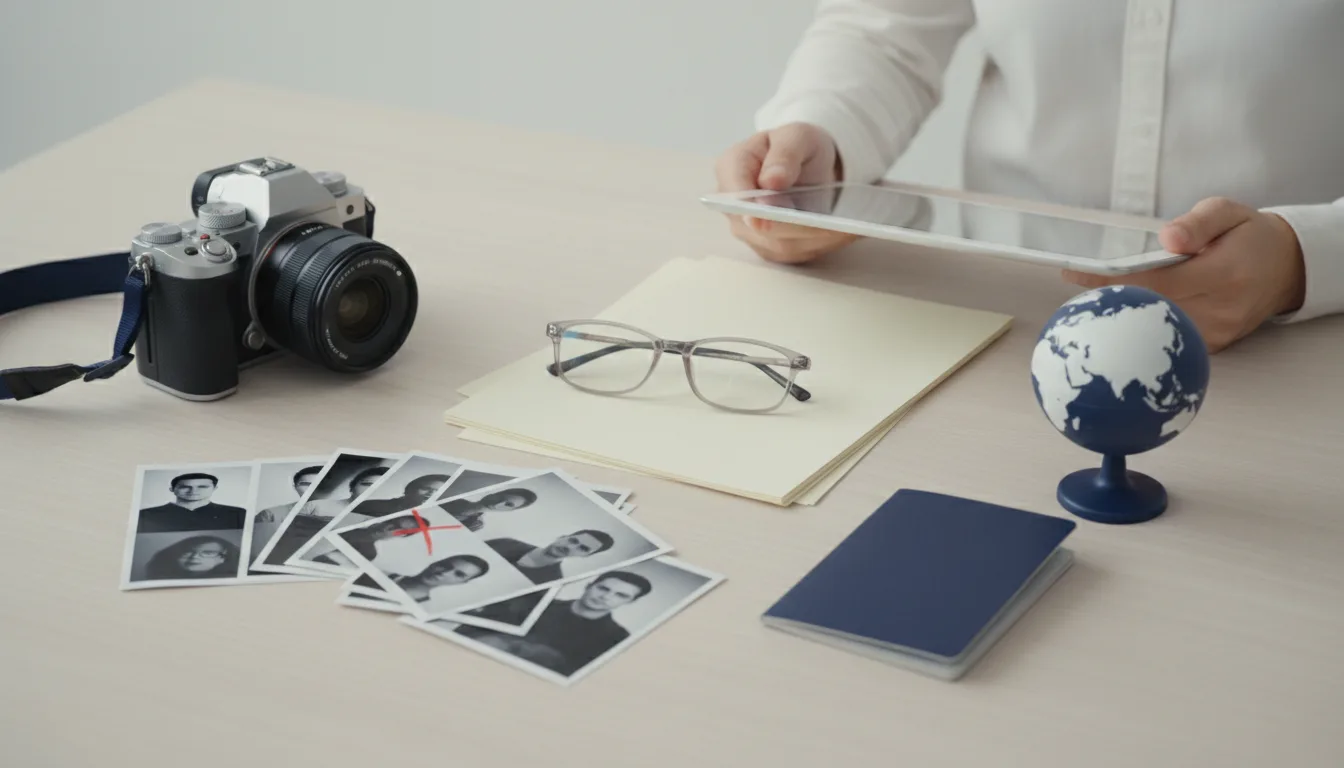
A DV lottery photo can be rejected twice, and the two rejections are nothing alike.
The first happens on the entry form: the file will not upload, or the entry will not go through. That one is annoying and completely fixable. The second happens much later, only if you are selected, when someone compares your photo with the rules and with your face. By then the entry cannot be changed, and the instructions say a photo that does not fully meet the specifications may make you ineligible.
This guide covers both, cause by cause, so the first check is the only rejection you ever see.
Every rule here comes from the Department of State's instructions for the DV-2026 program, the most recent full set published, read on an official U.S. embassy mirror, plus the State Department's visa photo pages and the March 2026 final rule amending the DV regulation.
First, which kind of rejection is it?
| What happened | What it means | Can you fix it? |
|---|---|---|
| The form refuses the image file | The file fails format, size or dimensions | Yes, re-export and upload again |
| The entry is rejected at submission | The E-DV system did not record your entry | Yes, resubmit before the deadline |
| No confirmation number after "Submit" | The entry was not recorded | Yes, submit again; it is not a duplicate |
| Selected, then photo found non-compliant | A consular decision on eligibility | No, the entry is fixed at submission |
The DV-2026 instructions are clear on the middle rows. If the E-DV system rejects your entry, you can resubmit, and you will not be penalized for a duplicate entry after a rejection. If you did not receive a confirmation number, your entry was not recorded and you must submit another. Once you do have a confirmation number, do not submit again: the law allows only one entry per person, and more than one disqualifies all of them.
The instructions do not publish the list of checks the entry form runs on your photo, or its error messages, and the form is not open to test. So we will not pretend to quote them. What follows are the eight causes the published rules make possible, starting with the ones a machine catches at upload.
The 8 causes, and the fix for each
1. The file is not a JPEG
The instructions accept one format: JPEG (.jpg). Recent iPhones save HEIC by default, screenshots come out as PNG, and some messaging apps change formats in transit. Renaming a file to ".jpg" does not change what is inside it.
Fix: export or convert the original photo to JPEG, then check the file's real type, not just its name.
2. The file is over 240 kB
This is the limit that catches straight-from-the-phone files. A full-resolution photo from a recent phone is commonly measured in megabytes, many times the ceiling. The instructions say the image must be equal to or less than 240 kB.
Fix: resize to 600 x 600 first; that alone brings most files down a long way. If it is still over, lower the JPEG quality a step at a time. Do not shrink the image below 600 pixels to save bytes: the dimension rule is fixed. The State Department's general visa guidance sets a compression ratio of 20:1 or less, so stop before the face turns blocky. Our passport photo file size guide walks through the trade-off.
3. The image is not square, or not 600 x 600
The DV entry is stricter than the DS-160 here. The DS-160 accepts anything from 600 x 600 to 1200 x 1200. The DV instructions say 600 x 600 pixels, in a square aspect ratio, height equal to width.
Fix: crop the original photo to a square, then resize to exactly 600 x 600. If you are scanning a print instead, it must be 2 x 2 inches (51 x 51 mm) scanned at 300 pixels per inch, which lands on 600 x 600. More on the format in our 600x600 photo guide.
4. The head is too small or too large
The instructions size the head at 50% to 69% of the image's total height, from the bottom of the chin to the top of the head. The State Department's composition template adds that the measurement includes the hair, and that the eye line should sit between 56% and 69% of the height, measured from the bottom.
In a 600-pixel image, that arithmetic gives:
| Measurement | Percentage | In a 600 x 600 image |
|---|---|---|
| Head height, minimum | 50% | 300 px |
| Head height, maximum | 69% | 414 px |
| Eye line from bottom, minimum | 56% | 336 px |
| Eye line from bottom, maximum | 69% | 414 px |
Most failures are heads that are too small: the photo was taken from across the room and cropped to include the wall.
Fix: retake closer, or crop tighter from the original so the head fills about 60% of the height, leaving a margin on both sides of the window.
5. The background is not plain white or off-white
Beige walls, patterned curtains, a door frame, a shadow thrown by your own head. The instructions ask for a plain white or off-white background. Note that the regulation says photos with very dark or patterned, busy backgrounds "will not be accepted".
Fix: stand a little way in front of a white wall so your shadow falls behind you and out of frame, with soft daylight on your face.
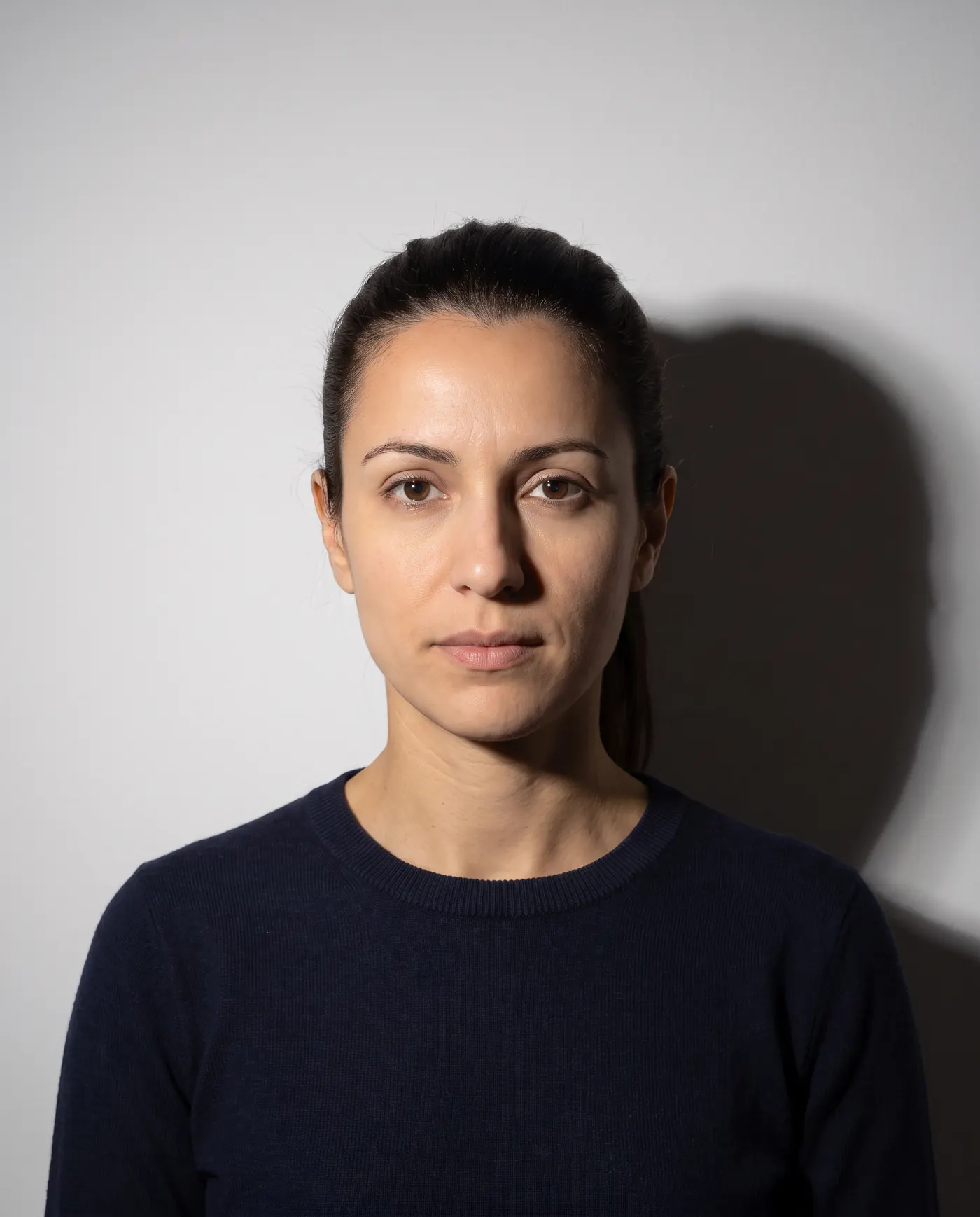 Rejected
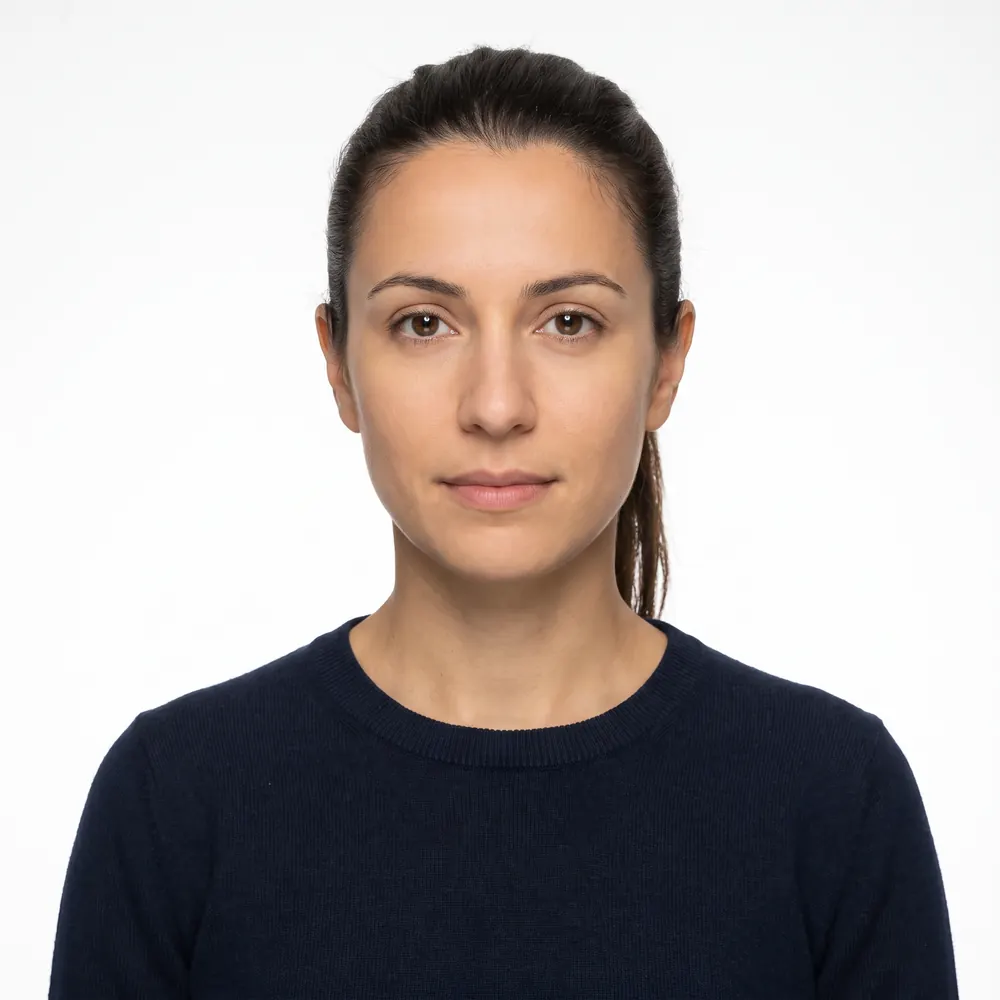 Accepted
6. Eyeglasses, headphones or a non-religious hat
The DV instructions say it in four words: "Do not wear eyeglasses." There is no medical exception written into the DV instructions, unlike the general visa guidance. Headphones, wireless hands-free devices and similar items are not acceptable either. A hat or head covering that hides the hair or hairline is only acceptable if worn daily for a religious purpose, and your full face must still be visible. A hearing device you normally wear is fine.
Fix: glasses off (not pushed onto your head), earbuds out, everyday clothing, no uniform.
7. The photo was edited
This is the cause no upload check can be relied on to catch, and the one with the worst outcome. The instructions say a photograph that has been manipulated may make you ineligible, and the State Department's visa photo rules say photos must not be digitally enhanced or altered to change your appearance in any way. Its FAQ even rules out digitally removing red-eye.
Background replacement, skin smoothing, "enhance" buttons, beauty filters and AI touch-ups all change what the camera captured. Cropping and resizing do not. Our guide to AI-edited passport photos explains where the line sits and why reviewers look for it.
Fix: delete the edited file and retake the photo in better light.
8. The photo is too old, or from a previous entry
Two recency rules, one of them fatal:
- The photo must be taken within the last six months and reflect your current appearance.
- "Submitting the same photograph that was submitted with a prior year's entry will make you ineligible for a DV."
The second rule catches people who did everything right last year and kept the file that worked. It also applies to every family member's photo, not just yours. Photos copied or scanned from a driver's licence or other official document are not acceptable either.
Fix: new photos for everyone, every entry period. Delete old DV files once the period closes.
- JPEG, exactly 600 x 600 pixels, square
- 240 kB or less, without shrinking below 600 px
- Head 50-69% of the height, about 300-414 px
- Plain white or off-white wall, no shadow behind
- Taken in the last six months, for every person on the entry
- HEIC, PNG or a renamed file that isn't really a JPEG
- Eyeglasses, earbuds or headphones
- Background replaced, skin smoothed or filters applied
- The same photo you used in a previous year's entry
- A photo scanned from a licence or another document
Rebuild a rejected photo from scratch
If you have been going round in circles with one file, stop editing it. Start from a new capture.
- 1
Set up against a white wall
Plain white or off-white, in daylight. Stand a little way off the wall so no shadow lands behind you. Glasses off, earbuds out.
- 2
Have someone else take it
Camera at eye level, facing you squarely, close enough that your head and shoulders fill most of the frame. Neutral expression, both eyes open.
- 3
Crop the original to a square
Work from the camera file, not a screenshot or a copy sent through a messaging app. Place the head so it fills about 60% of the height, eyes a little above the middle.
- 4
Export at 600 x 600 as JPEG
Check the real file type and the size. If it is over 240 kB, lower the JPEG quality, not the dimensions.
- 5
Repeat for every person on the entry
Spouse and each derivative child, one photo each, all taken within six months. Name the files so nobody's photo is uploaded in the wrong slot.
- 6
Have everything ready before opening the form
The instructions give you 60 minutes from the moment you download the form, and the system discards partial entries. Photos must be submitted with the entry, not afterwards.
The passport scan is a different upload
From the DV-2027 program, the entry form asks for more than photos. The Department of State's final rule, published March 11, 2026, effective April 10, 2026 and implemented with the DV-2027 program, requires the entrant to give valid, unexpired passport details and upload a scan of the passport's biographic and signature page, unless an exemption applies.
The limits for that scan are not the photo limits:
| Upload | Format | Size limit |
|---|---|---|
| Entrant and family photos | JPEG, 600 x 600 px | 240 kB |
| Passport biographic page scan | JPEG, no PDF | 5 MB |
Public comments on the rule flagged potential problems with passport scans, including cropped images, blurred pages and the 5 MB limit. If an upload fails, check which one it is before you start re-exporting your face. The scan is the entrant's own passport; family members still need their photos. Our DV lottery family photos guide covers who must be on the entry.
Where our tool fits, honestly
We are an independent photo tool with no connection to the Department of State or the DV program. We cannot see the entry form, submit an entry or tell you why a specific upload failed on the day.
What we do is the file work behind causes 1 to 4: crop a new phone photo square, measure the head against the 50-69% window, export a 600 x 600 JPEG under 240 kB, and check tilt, background evenness, sharpness and exposure before you pay. It can't detect glasses, so take them off yourself. For causes 7 and 8 there is nothing to fix in software; the answer is a new, unedited photo. When your wall is white and the glasses are off, check a new photo before you open the form — the DV lottery photo page covers the same file checks.
For the full specification, read our DV lottery photo requirements guide. For how the DV entry compares with the DS-160, the DS-260 and USCIS forms, see the US visa and immigration photo guide.
Frequently asked questions
Why won't the DV entry form accept my photo?
Most often it is the file, not the face. The DV instructions require a JPEG, exactly 600 x 600 pixels, square, 240 kB or less. A phone photo is usually rectangular, several megabytes and often saved as HEIC, so it fails on shape, size and format before anyone looks at the picture.
If the form accepts my photo, is it approved?
No. Acceptance at upload only means the file went through. The instructions say you may be ineligible if the photos for you and your family do not fully meet the specifications or have been manipulated in any way, and that is judged later, if you are selected, not at submission.
Can I resubmit my DV entry after a photo problem?
If the E-DV system rejects your entry, yes. The DV-2026 instructions say you can resubmit before the deadline and will not be penalized for a duplicate after a rejection. If you did not get a confirmation number, the entry was not recorded. Once you have a confirmation number, do not submit again.
How big should my head be in a 600 x 600 DV photo?
Between 50% and 69% of the image height, measured from the bottom of the chin to the top of the head including hair. In a 600-pixel image that works out to roughly 300 to 414 pixels. The State Department's template puts the eyes between 56% and 69% of the height from the bottom.
Can I fix a DV photo by editing the background?
No. The DV instructions say a photograph that has been manipulated may make you ineligible, and the State Department says visa photos must not be digitally enhanced or altered to change your appearance. Cropping and resizing are fine. Retake the photo against a real white or off-white wall instead.
Is the passport scan the same as the photo upload?
No. The March 2026 rule adds a separate upload: a scan of the entrant's passport biographic and signature page, as a JPEG no larger than 5 MB, with PDFs not accepted. It has different limits from the 240 kB photo, so check which upload the form is complaining about.
Sources
- U.S. Embassy in Cameroon - Instructions for the 2026 Diversity Immigrant Visa Program (DV-2026), Submitting a Digital Photograph and FAQ
- U.S. Department of State - Visa Photo Requirements (travel.state.gov content, read on the adoption.state.gov mirror)
- U.S. Department of State - Digital Image Requirements
- U.S. Department of State - Photo Composition Template
- U.S. Department of State - Photo Frequently Asked Questions
- Federal Register / GovInfo - Visas: Enhancing Vetting and Combatting Fraud in the Diversity Immigrant Visa Program, final rule (March 11, 2026)
- U.S. Embassy in Hungary - Changes to Entry Period for the 2027 Diversity Visa Program
- U.S. Embassy in Samoa - Beware of Scams: DV-2027 Has Not Started
The DV lottery specification, with the official source of each value: DV lottery photo: exact size and free check
Keep reading
 Requirements
 DV Lottery Photo Rules: Don't Get Disqualified
DV lottery photo rules: a 600x600 JPEG under 240 kB, a separate photo per family member, and the reuse rule that makes an entry ineligible.
Read the guide Requirements
 DV Lottery Family Photos: Who Must Be on the Entry
DV lottery family photos: a separate photo for you, your spouse and every unmarried child under 21, who is exempt, and the omissions that void an entry.
Read the guide Requirements
 US Visa and Immigration Photos by Form: 2026 Guide
Which US visa and immigration forms need your photo in 2026: DS-160 uploads, DS-260 prints, DV entries, USCIS forms and biometrics, in one sourced table.
Read the guide Requirements
 N-400 Photo 2026: Do You Still Send Two Photos?
Most N-400 filers send no photos: USCIS takes a new one at biometrics. Who still mails two 2x2 prints, and the photo you need next for a first US passport.
Read the guide Requirements
 DS-260 Photo Requirements 2026: Two Prints, No Upload
DS-260 immigrant visa photos: two identical 2x2 inch color prints at the interview, head 1 to 1 3/8 in, no glasses. How it differs from DS-160 and USCIS.
Read the guide Requirements
 ESTA Photo 2026: Passport Scan and the Selfie Rule
The photos an ESTA application asks for in 2026: the passport page upload, the website's selfie rules, the app's live selfie and CBP's pending changes.
Read the guide