Requirements
India e-Visa Photo Upload: Size, Format and Fixes
The photo India's e-Visa portal accepts: square JPEG, 10 KB to 1 MB, no glasses, plain white or light background, plus fixes for the upload errors.
Making the photo now? India visa photo: exact size and free check

By Antoine Duno
Published 9 min read
Specs verified on September 16, 2026 against the issuing authority
India's e-Visa application asks for at least two uploads before you pay: a photo of your face and a scan of your passport's bio page. The photo has its own specification, and it isn't the one people expect. It isn't the Indian passport's 4.5 x 3.5 cm rectangle, and it isn't the OCI photo either. It's a square JPEG between 10 KB and 1 MB, with no glasses, on a plain light or white background.
Every requirement here comes from the Government of India's e-Visa page on indianvisaonline.gov.in, read on September 16, 2026. It's the only official site for the application. Nothing here comes from a visa agency's summary.
- Format
- JPEG
- File size
- 10 KB minimum, 1 MB maximum
- Shape
- Height and width equal (square)
- Pixel dimensions
- Not published
- Pose
- Full face, front view, eyes open
- Glasses
- Without spectacles
- Framing
- Head centred; top of hair to bottom of chin
- Background
- Plain light-coloured or white
- Shadows
- None on face or background
- Borders
- None
- Passport bio page
- PDF, 10 KB to 300 KB
Three Indian photos, three different specifications
An easy mistake is reusing the wrong Indian photo. There are at least three, and they don't overlap:
| Indian passport | OCI card | Indian e-Visa | |
|---|---|---|---|
| Who it's for | Indian citizens | Overseas Citizens of India | Foreign visitors |
| Shape | 4.5 x 3.5 cm rectangle | Square | Square |
| Submitted as | Print, if at all | JPEG upload | JPEG upload |
| Glasses | Clear allowed, no coloured or dark | Not stated in the OCI FAQ | Without spectacles |
| Background | Plain white | Plain light colour, "not white" | Plain light-coloured or white |
The passport column comes from Passport Seva's instruction booklet, which our India passport photo requirements guide covers in full. That booklet also explains that most passport applicants at a Passport Seva Kendra don't supply a photo at all. The OCI portal has its own pixel and file-size limits, and its FAQ asks for a light background that is "not white", so a plain white e-Visa photo won't carry over; the OCI photo requirements guide has the details.
For the e-Visa, what matters is that you can't crop a passport-format rectangle down to a square without cutting into the head or leaving it too small, and a passport photo with glasses on is refused outright.
The file: what "10 KB to 1 MB, square, JPEG" means in practice
Square means exactly square
The page says "The height and width of the Photo must be equal." Not roughly equal. A photo straight off a phone camera is a rectangle, usually 4:3 or 16:9, so it breaks this rule before anything else is looked at. Crop it so both sides have the same pixel count.
No pixel dimensions are published for the e-Visa, so there's no official minimum like the 600 x 600 of a US visa. Our passport photo size in pixels guide lists the countries that do publish one. In practice, a square image a few hundred pixels across, saved as a good-quality JPEG, usually lands between 10 KB and 1 MB. The file-size window is what you have to hit.
Between 10 KB and 1 MB
Both ends cause failures:
- Over 1 MB. A full-resolution phone photo is usually several megabytes. Cropping it square helps, but often not enough. Resize it down and export as JPEG.
- Under 10 KB. This happens to photos that have been through a messaging app, a social media download or a screenshot of a thumbnail. A file that small is also likely to be too blurry to use, which gives the portal a second reason to refuse it. Go back to the original photo.
Our guide to passport photo file size in KB walks through getting under a limit without visible compression damage.
JPEG, not PNG or HEIC
The only format listed for the photo is JPEG. Many phones save photos as HEIC, and screenshots are usually PNG. Renaming a file's extension doesn't convert it. Export or save it as JPEG.
Don't mix up the two uploads
The passport bio page is a separate upload with separate rules: PDF, 10 KB to 300 KB. People upload their passport scan into the photo slot, or a JPEG photo of the passport into the PDF slot, and both fail. The face photo is a JPEG of you. The passport page is a PDF of the document.
The photo itself: what the specification asks for
The photo rules on the e-Visa page are short:
- "Photo should present full face, front view, eyes open and without spectacles"
- "Center head within frame and present full head from top of hair to bottom of chin"
- "Background should be plain light colored or white background."
- "No shadows on the face or on the background."
- "Without borders."
The general instructions on the same page describe the upload as a "Recent front facing photograph with white background." No maximum age is given in days. Use a photo that looks like you do now.
No glasses
This is the rule that catches Indian-origin travellers who already have a photo from a passport application, where clear glasses are allowed. On the e-Visa, the wording is "without spectacles," with no exception listed. Take them off. Our guide to glasses in passport photos compares this with other countries.
Full head, centred
"Top of hair to bottom of chin" means the crop must not cut through your hair. Leave a margin above your head and keep your face in the middle of the square. The e-Visa page gives no head-size percentage. India's regular visa instructions page, which is a different application, does give a head size of 1 inch to 1-3/8 inches (25 mm to 35 mm) for its photo, but that figure isn't stated for the e-Visa.
Plain background, no shadows, no border
A plain white wall with you standing a little way in front of it, facing a window, handles both the background and the shadow rule. "Without borders" rules out a photo that has been placed on a white canvas to make it square, or a scan of a print with its white edge showing. Crop the actual photo instead.
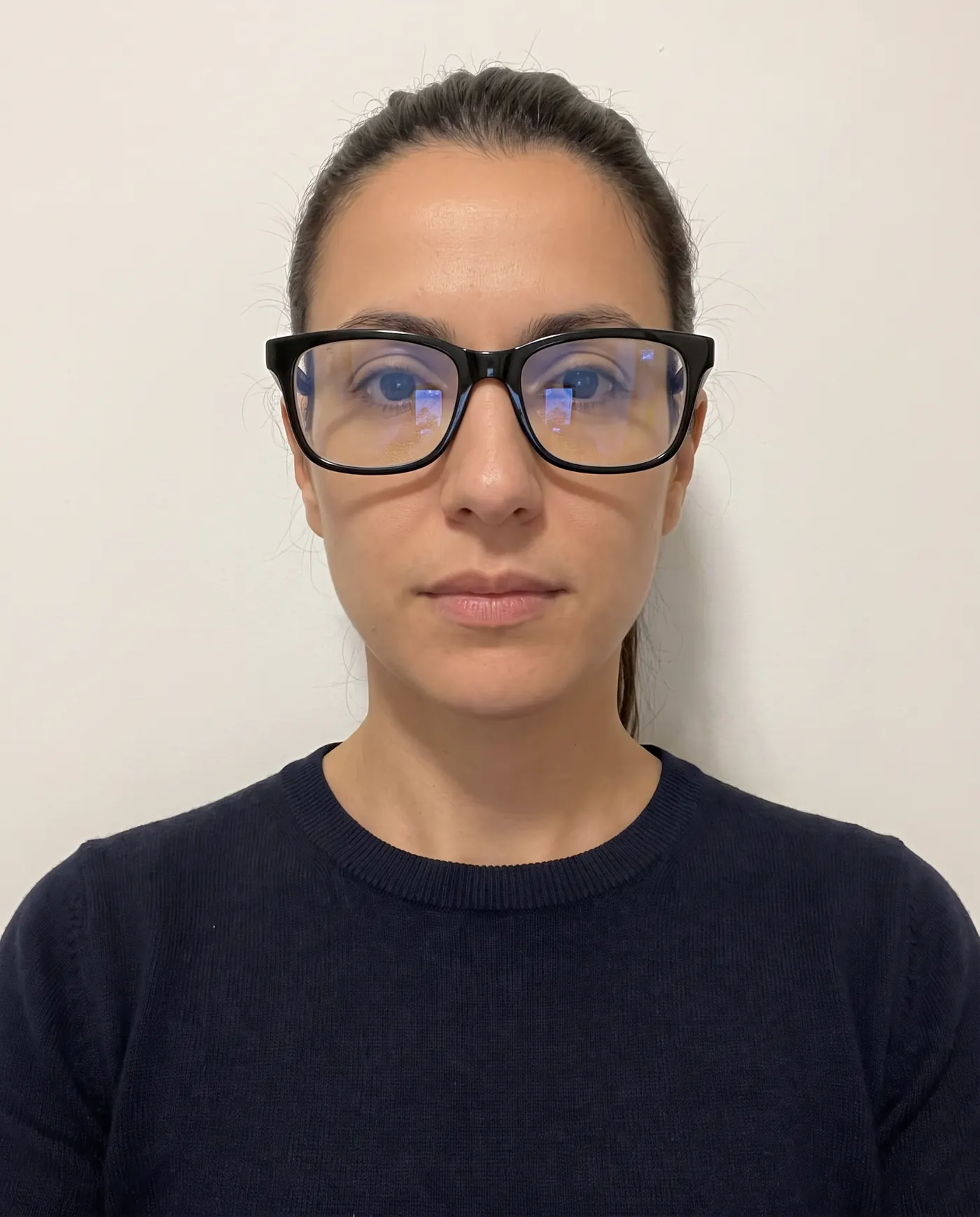 Rejected
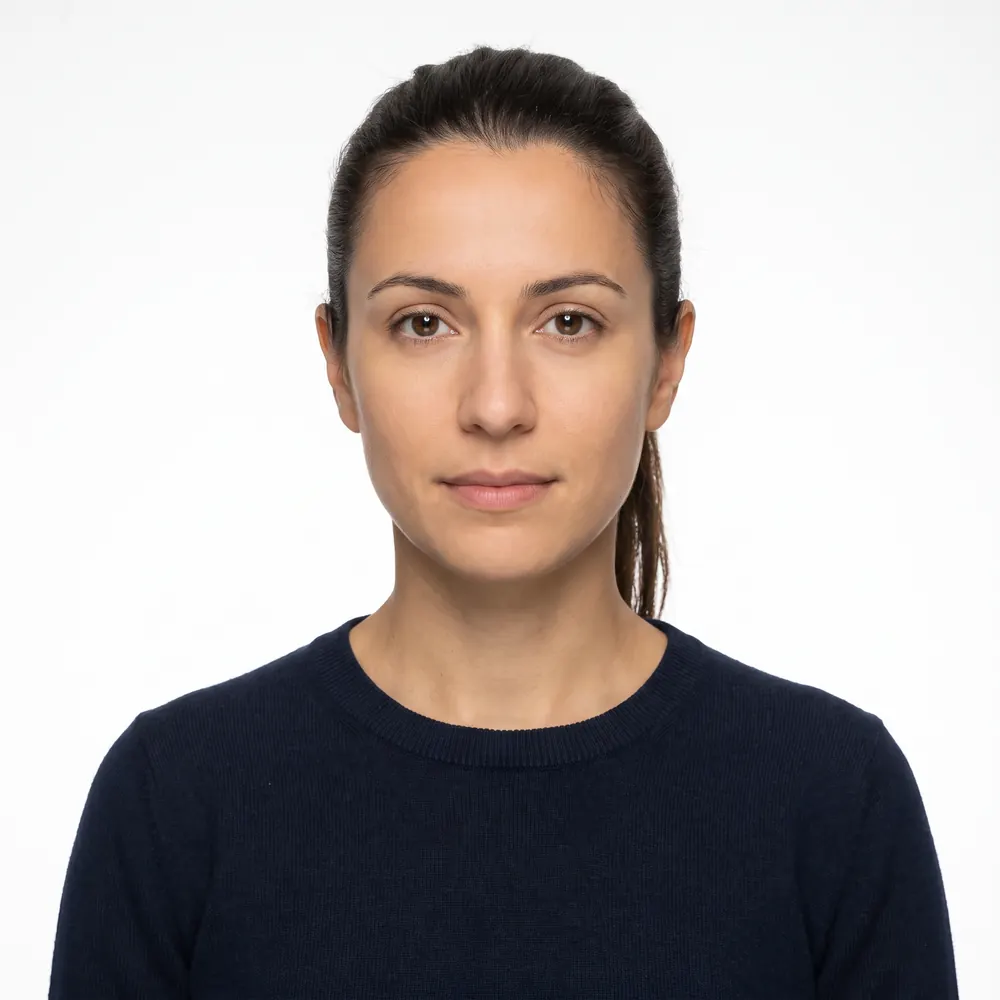 Accepted
Upload errors and their fixes
The portal's messages don't always say which rule failed. Work through the file first, then the photo.
| Symptom | Likely cause | Fix |
|---|---|---|
| Rejected immediately on upload | File over 1 MB, not square, or not JPEG | Crop square, resize, export as JPEG |
| Rejected as too small | File under 10 KB, often a chat-app or screenshot copy | Use the original camera photo |
| Photo slot refuses your passport scan | Wrong upload: the bio page belongs in the PDF slot | Upload a face photo as JPEG; bio page as PDF, 10-300 KB |
| Passport slot refuses the file | Scan saved as JPEG, or over 300 KB | Save the scan as PDF and reduce it under 300 KB |
| Email asking you to re-upload after submitting | Image judged not clear or not per specification | Retake with glasses off, plain background, even light; re-upload via the re-upload tab |
The re-upload route is on the e-Visa page itself: "if any Document/Image is not appropriate, you may be advised on your given e-mail to re-upload the same. To re-upload use the tab at the bottom of the page." Watch the email address you gave on the application.
Take and upload the photo, step by step
- 1
Set up against a plain white wall
Stand a little way in front of the wall so your shadow falls behind you, out of frame. Face a window for even daylight. Glasses off, hat off, hair away from the face.
- 2
Shoot head and shoulders at eye level
Have someone hold the phone at your eye level, a few feet away. Face the camera straight on, eyes open, neutral expression. Take several shots and pick the sharpest.
- 3
Crop square around the full head
Keep the whole head from the top of the hair to the chin, centred, with a margin above. Height and width must be exactly equal. Don't add a border.
- 4
Export as JPEG between 10 KB and 1 MB
Resize if the file is over 1 MB. If it's under 10 KB, start again from the original photo, not a copy sent through a messaging app.
- 5
Prepare the passport page separately
Scan the bio page to PDF and keep it between 10 KB and 300 KB. It goes in its own upload slot.
- 6
Check before you pay
The FAQ says to check every detail, photograph included, before final submission. Only apply on indianvisaonline.gov.in, and make sure each child has a separate application and photo.
Where our tool fits, honestly
We aren't the Government of India or a visa agent, and we can't submit or speed up your e-Visa. You apply yourself on indianvisaonline.gov.in, and the Indian authorities decide. The FAQ also warns applicants to "beware of unscrupulous elements/ travel agents/ intermediaries demanding extra payment" at the airport.
What we do is the file. Start with a phone photo and we crop it square, resize it and export a JPEG inside the 10 KB to 1 MB window. We check head position and tilt, whether the background is plain and even, and sharpness and exposure. Two limits to know. The e-Visa page publishes no head-size rule, so our framing check uses a general visa window rather than an Indian figure. And we can't reliably detect glasses, so take them off before you shoot. We don't repaint backgrounds or smooth faces.
Checklist before you upload
- JPEG, square, between 10 KB and 1 MB
- Full face, front view, eyes open, head centred
- Whole head in frame, from top of hair to chin
- Plain white or light background, no shadows
- Passport bio page as a separate PDF, 10 KB to 300 KB
- Glasses of any kind
- A rectangular phone photo or your Indian passport-format photo
- PNG, HEIC or a screenshot
- A white border added to make the image square
- A photo shared through a messaging app and now under 10 KB
Planning more of the trip online? Other e-Visa portals in the region have their own rules; see the Vietnam e-Visa photo guide, and for the general approach to any upload form, how to upload a digital passport photo.
Frequently asked questions
What size photo do I need for the India e-Visa?
A square JPEG between 10 KB and 1 MB. The e-Visa page says the height and width of the photo must be equal. It publishes no pixel dimensions, so any square image inside the file-size range fits the rule, as long as your full head is centred and clearly visible.
Can I wear glasses in my India e-Visa photo?
No. The e-Visa page asks for a photo that presents full face, front view, eyes open and without spectacles. That is stricter than the Indian passport booklet, which only rules out coloured or dark glasses, so an Indian passport photo with glasses on is not a safe reuse.
What background does the India e-Visa photo need?
The upload specification says a plain light coloured or white background, with no shadows on the face or the background. The e-Visa page's general instructions describe the photograph as having a white background, so plain white is the choice that satisfies both wordings.
Why does the e-Visa site keep rejecting my photo upload?
Usually because of the file, not your face. Phone photos are rectangular and often several megabytes, so they break the square and 1 MB rules. A screenshot or a chat-app copy can drop below 10 KB. PNG and HEIC files are not JPEG. Crop square, export as JPEG, then check the size.
What if my e-Visa photo is not accepted after I submit?
The e-Visa page says submitted applications are scrutinised, and if a document or image is not appropriate you may be advised by email to re-upload it, using the re-upload tab on the site. It also warns that applications can be rejected if the photograph is not as per specification, and the fee is non-refundable.
Does each child need a separate e-Visa photo?
Yes. The e-Visa FAQ says a minor travelling with a parent needs a separate e-Visa application, and every application asks for its own photograph and passport page. Take a separate, recent photo of each child that meets the same rules: square, full face, eyes open, plain light background.
Sources
- Government of India - e-Visa page: instructions, document and photo specifications, FAQ (indianvisaonline.gov.in)
- Government of India - Indian Visa Online: instructions for regular visa applications (photo requirements)
- Ministry of Home Affairs - OCI FAQ (question 9, photo specifications)
- Passport Seva - Instructions for filling the passport application form (V3.0)
The India visa specification, with the official source of each value: India visa photo: exact size and free check
Keep reading
 Requirements
 India Passport Photo Size and Rules for 2026
India passport photo requirements from Passport Seva's own instruction booklet: 4.5 x 3.5 cm, plain white background, and when you need no photo at all.
Read the guide Requirements
 OCI Photo Requirements 2026: Square Photo and Signature
OCI photo and signature specs from the MHA portal and VFS USA: square photo, pixel and KB limits, background, face size, and where the sources disagree.
Read the guide Requirements
 UAE Visa Photo Requirements: ICP and GDRFA Rules 2026
UAE visa and residency photo rules from ICP and GDRFA Dubai: 3.5 x 4.5 cm, white background, width 35 to 40 mm, plus what neither publishes about uploads.
Read the guide Requirements
 Vietnam e-Visa Photo: 4x6 cm, JPG Under 2 MB, No Glasses
What Vietnam's official e-visa portal asks of the photo: 4x6 cm, JPG or JPEG under 2 MB, no glasses or hat, white background, and what it never states.
Read the guide Requirements
 Japan Visa Photo 2026: 45x35 mm Form, eVISA Upload
Japan's visa form says 45 x 35 mm, some embassies say 45 x 45 or 35 x 45. Which to use, and the JAPAN eVISA upload rules. Checked September 2026.
Read the guide Requirements
 China Visa Photo Requirements: 33x48 mm Rules 2026
China visa photos are 33 x 48 mm on glossy paper with a 28-33 mm head; online uploads are a 354-420 px JPEG of 40-120 KB. Specs verified September 2026.
Read the guide