Requirements
Why Passport Photos Get Rejected: 10 Real Causes
The ten reasons passport and visa photos really get rejected, the official rule behind each and the fix, plus specs for print, renewal and the DS-160.

By Antoine Duno
Updated Published 11 min read
Specs verified on September 16, 2026 against the issuing authority
The Department of State says on its own guidance that unacceptable photos are the number one reason it puts passport applications on hold. Almost all of those rejections come from ten causes, and most of them are set before the shutter fires — where you stand, what light you are in, whether your glasses are on.
This guide goes through all ten, with the rule behind each and the fix. The specification for whichever route you are taking is at the bottom of each section.
- Print size
- 2 x 2 in (51 x 51 mm)
- Head height
- 1–1 3/8 in (25–35 mm)
- Age of photo
- Taken in the last 6 months
- Color
- Color only
- Background
- Plain white or off-white
- Expression
- Neutral or closed-mouth smile
- Glasses
- Not allowed
- Paper
- Matte or glossy photo paper
- Edits
- None — original photo only
1. The background is not plain white or off-white
The rule is that the background must be white or off-white, plain, and free of shadows, texture, objects or lines. That excludes more than people expect: a blue wall, a wood door, a picture rail crossing behind your head, a curtain with any weave to it, a radiator, a light switch.
The fix: find the plainest light-coloured wall in the building, or drape a white sheet or blanket over a coloured one — the Department's own suggestion. Photograph in landscape-free framing against it with nothing else in shot.
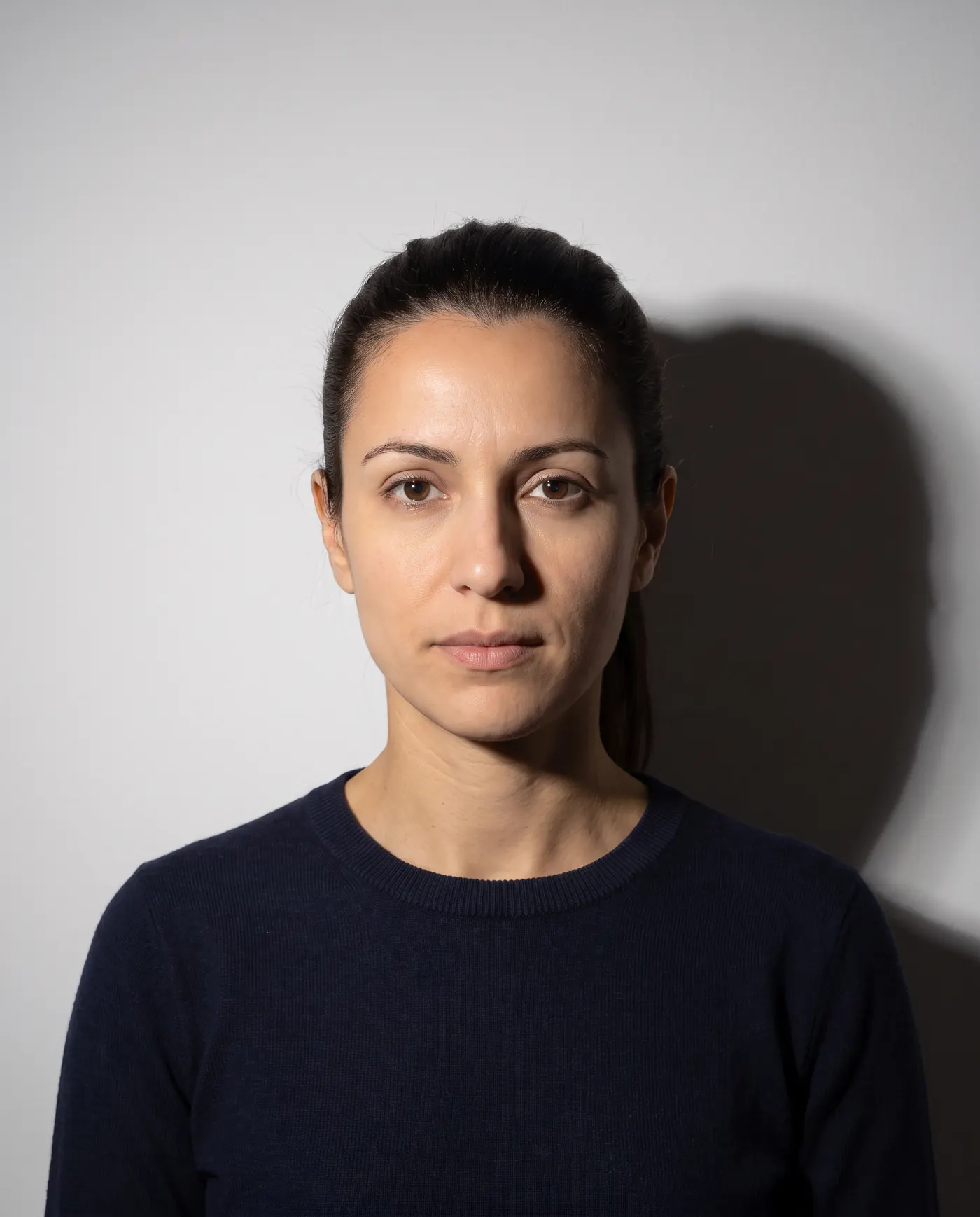
2. There is a shadow behind you
This is the same failure as the first one and it deserves its own entry because the cause is unintuitive. The shadow is not a lighting mistake; it is a distance mistake. Standing close to a wall puts your own shadow on it.
One of the State Department's unacceptable examples for online renewal is a photo with shadows on the side of the head and a thick grey stripe on the wall behind. Both come from the same setup.
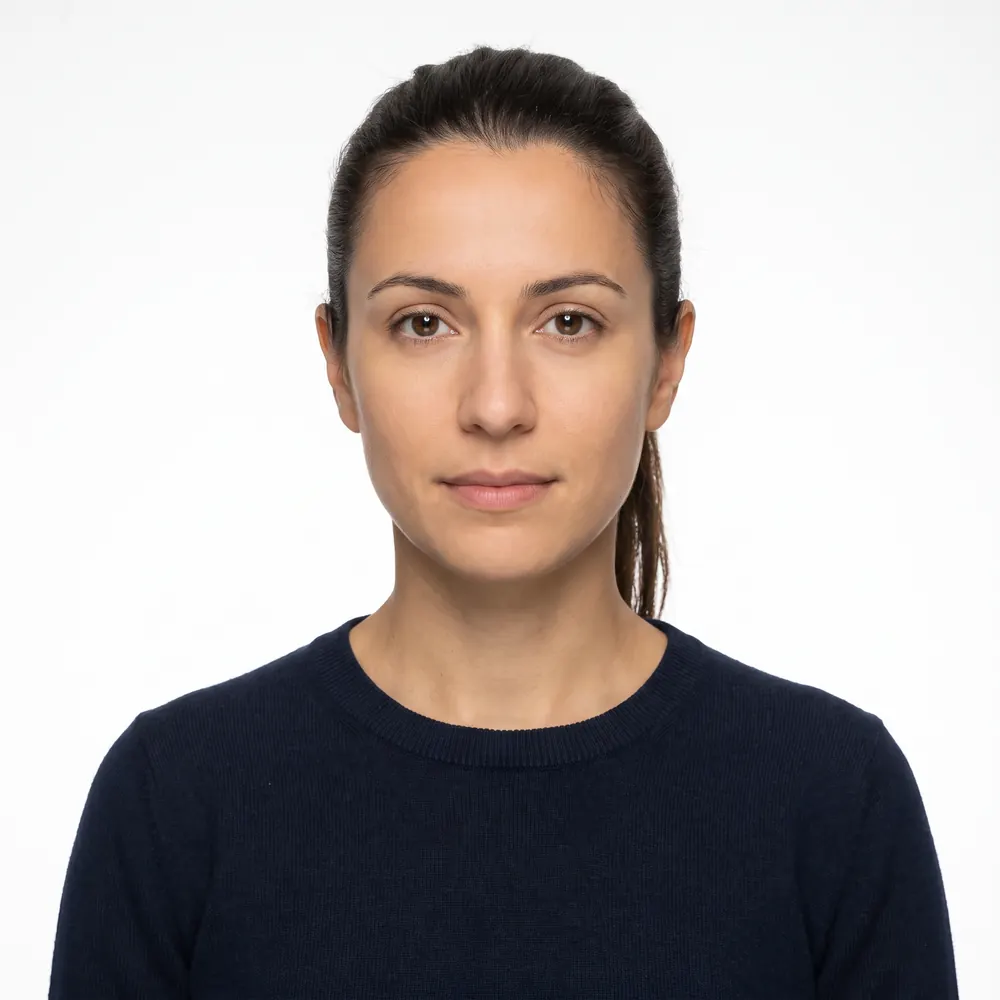
The fix: step two or three feet away from the wall. The shadow falls behind you, outside the frame. Then face a window so the light comes at you rather than over you.
 Rejected
 Accepted
For more side-by-side pictures, see our annotated passport photo examples of accepted and rejected photos.
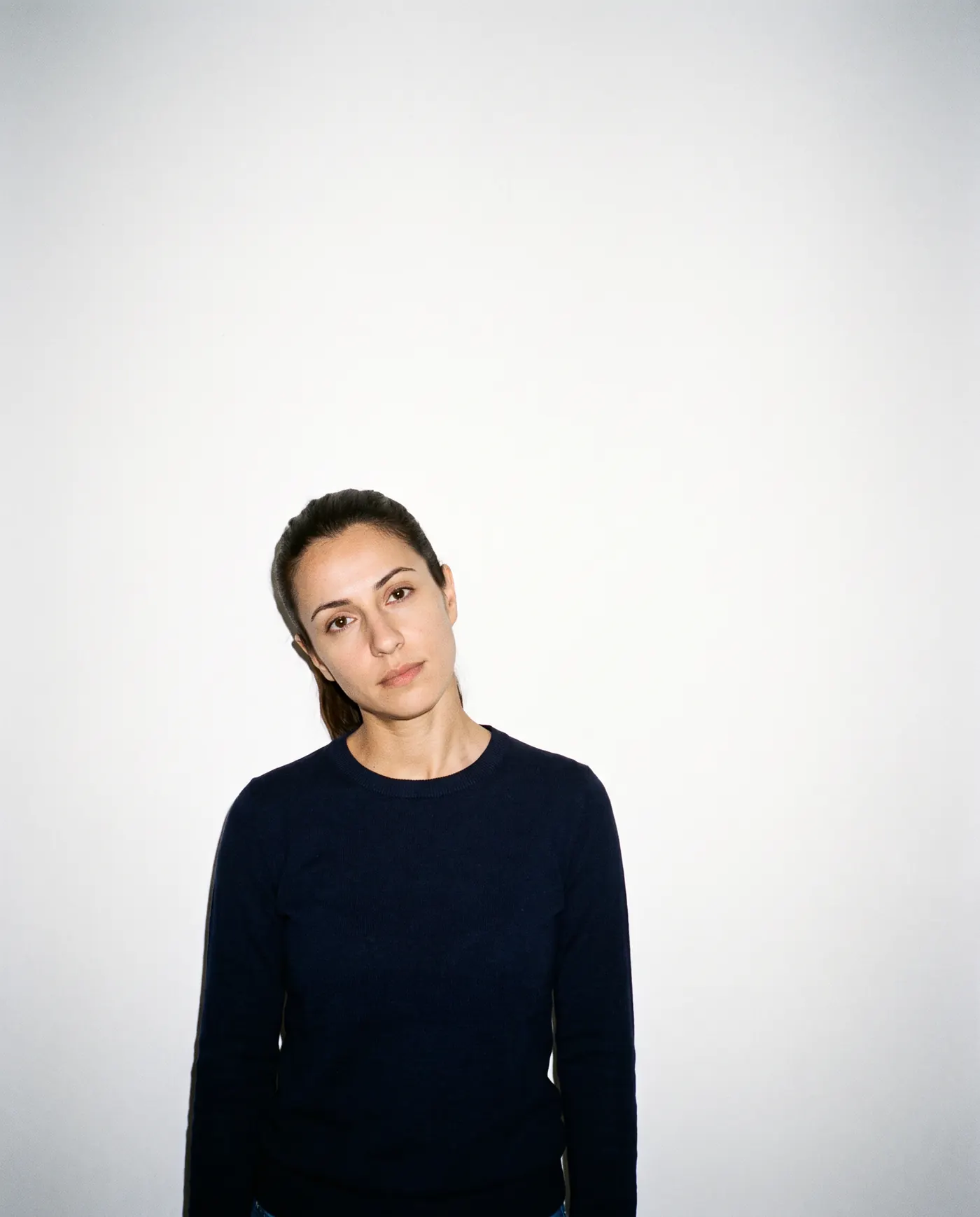
3. Your head is the wrong size or in the wrong place
Every route measures head size, and each measures it differently:
| Route | Head size rule |
|---|---|
| Printed 2 x 2 photo (passport or visa) | 1 to 1 3/8 in (25–35 mm), chin to top of head |
| DS-160 digital image | 50% to 69% of image height |
| Online passport renewal | Head and shoulders centred; bottom of the frame at the edge of your shoulders |
On top of size, the pose rules are firm: face the camera directly with your full face in view and your head not tilted, shoulders square to the camera, head centred. Unacceptable examples include looking down, looking up, a rotated head, a tilted head, and being too close or too far from the camera.
The fix: camera at your eye level, a few feet back, chin level, shoulders parallel to the lens. For a digital image, crop so the top of your hair sits near the top edge and your chin lands above the midline. The detail is in DS-160 photo requirements and US passport photo requirements.
 RejectedAccepted
4. You left your glasses on
Passport guidance: take off eyeglasses, sunglasses and tinted glasses, and do not rest them on your head. If you cannot remove them for medical reasons, include a signed note from your doctor with the application.
Visa guidance is stricter still. Eyeglasses have not been allowed in new visa photos since November 1, 2016, except in rare medical circumstances such as recent ocular surgery, and those require a signed statement from a medical professional. Even where an exception applies, the frames must not cover the eyes and there must be no glare, shadow or refraction obscuring them. Sunglasses and tinted lenses are never acceptable.
The fix: take them off. There is nothing to negotiate here, and glare from a flash on a lens is a separate rejection on top of the glasses themselves.
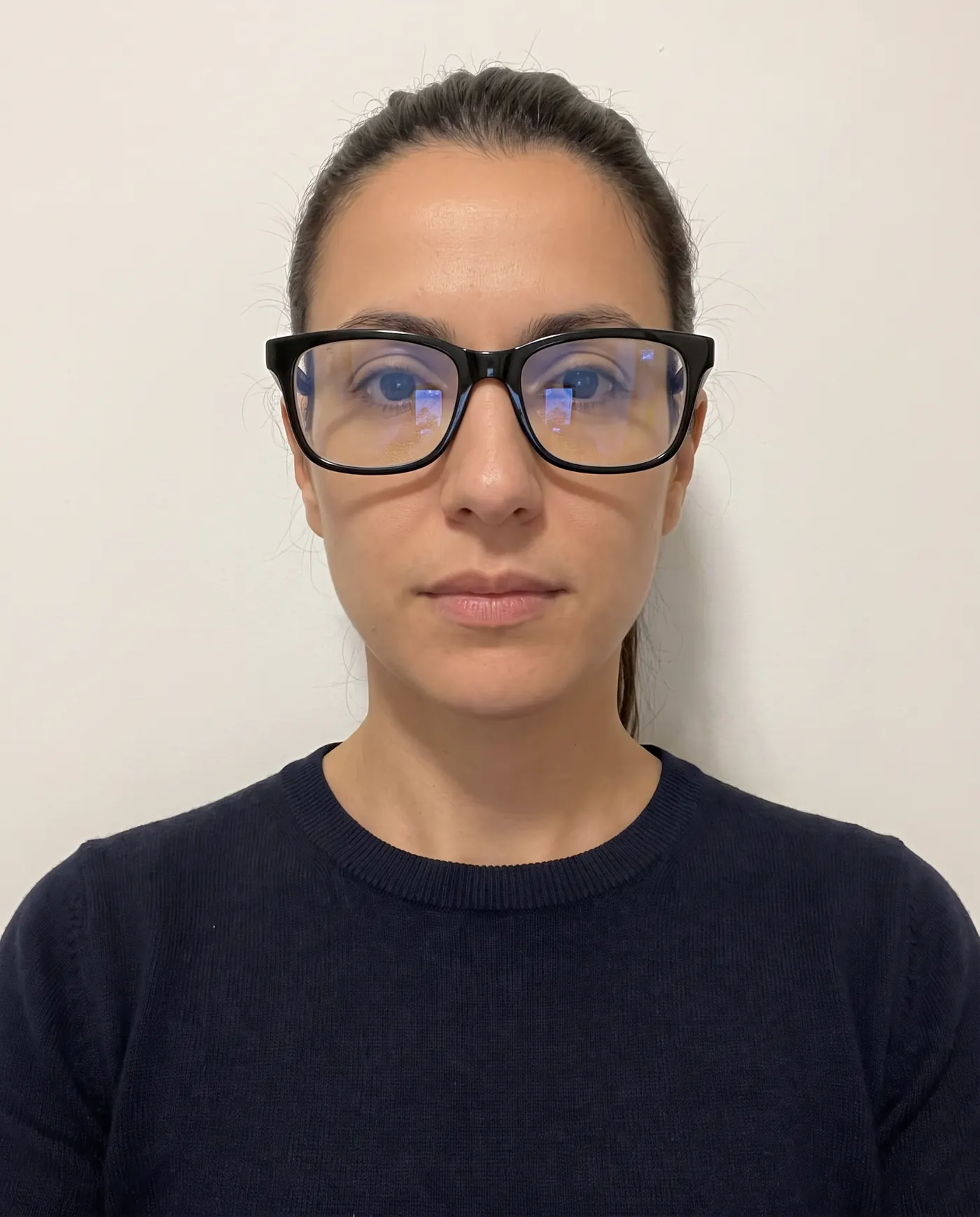 RejectedAccepted
5. Your expression or your eyes
For a US passport photo, you may smile as long as your eyes are open and your mouth is closed, and exaggerated expressions are out. The online renewal guidance asks for a neutral expression or natural smile and to avoid showing teeth. For a visa photo the standard is a neutral expression only, and the photo FAQ says photos with unusual expressions or squinting will not be accepted.
The eye rules are separate and catch people out: both eyes open, the coloured portions clearly visible, and hair not covering them. Unacceptable examples include closed eyes, eyes not fully open, and an open mouth.
The fix: relax the face, look straight down the lens, pin hair back off your eyes. If you are prone to blinking, shoot a burst and pick a frame. More nuance in can you smile in a passport photo.
6. The lighting is uneven, too bright or too dim
The requirement is uniform lighting on the face, a clear image that reproduces skin tones accurately, and no shadows. The published failures are specific: an underexposed photo, a photo where the colour is not accurate, shadows on the face and background, and lighting that is too strong on one side.
The fix: natural light from a window, facing you, in the middle of the day. Turn off overhead lights, which drop shadows into your eye sockets and under your nose. If the colour looks wrong, your camera's white balance is fighting an indoor bulb — the Department's own tip is to adjust that setting.
7. The photo is blurry, grainy, or a copy of a copy
A high-resolution photo, not blurry, grainy or pixelated, with no visible printer dots. Photocopies and digitally scanned photos are not accepted for passport applications, and for visas, photos copied or scanned from a driver's licence or other official document are not acceptable. Snapshots, magazine photos, low-quality vending machine or mobile phone photos, and full-length photographs are all out.
Two habits cause most of these: photographing a printed photo to make a digital file, and sending the image to yourself by text message, which the renewal guidance warns lowers quality.
The fix: set the camera to its highest quality setting before you shoot, keep the original file, and move it to your computer by cable or upload rather than by message.
8. You edited it
Filters, retouching, background replacement, AI enhancement. The passport guidance says to submit the original, unchanged photo and not to change it using computer software, phone apps or filters, or artificial intelligence. The online renewal guidance says a photo that is unnaturally edited or filtered will not be accepted and warns against photos created or edited with AI or other digital tools. The visa pages say photos must not be digitally enhanced or altered to change your appearance in any way.
The Department also says it checks all photos to make sure applicants are not using artificial intelligence tools, and publishes an AI-generated example that looks acceptable and is not.
The fix: fix the room, not the file. Cropping, rotating and resizing are permitted; everything else is not. Full detail in AI-edited passport photos.
9. The photo is too old, or no longer looks like you
Every application needs a photo taken within the last 6 months, and you cannot reuse the photo in your current passport. Separately, a photo that does not reflect your current appearance can be refused even if it is newer than six months — the visa guidance says the post will request a new photo in that case.
Whether you need a whole new passport is a different question. Small changes — growing a beard, colouring your hair, normal ageing — do not require one, and beards and makeup in a passport photo covers what else counts as a face change. Significant facial surgery or trauma, adding or removing many large facial piercings or tattoos, and significant weight loss or gain do.
The fix: take a new photo for each application. It costs minutes.
10. What you are wearing
| Item | Rule |
|---|---|
| Hats and head coverings | Off, unless worn daily for religious reasons or required medically, with a signed statement |
| Permitted head covering | Full face visible, no shadows, one colour, no patterns or small holes |
| Face masks and coverings | Off — your full face must be visible |
| Scarves | Must not cover any part of the face or chin |
| Uniforms, uniform-like clothing, camouflage | Not allowed |
| Headphones and wireless earpieces | Not allowed in or on your ears |
| Hearing devices | Allowed for visa photos if worn normally |
| Jewellery and piercings | Allowed if they do not hide your face |
| ID badges and lanyards | Take them off before you shoot |
The fix: a plain top in a colour that is not white, nothing on your head, nothing in your ears, hair clear of your face.
- 1
Pick the wall and the window
A plain white or off-white wall, with a window in front of you. Stand two or three feet clear of the wall so no shadow lands on it.
- 2
Set the camera up properly
Someone else holds it, at your eye level, a few feet back. Highest quality setting, no filters, no beauty mode, flash off.
- 3
Strip the frame
Glasses off, hat off, lanyard off, earbuds out, hair away from your eyes. Shoulders square, chin level, neutral expression or a closed-mouth smile.
- 4
Shoot several frames
Blinks and half-smiles are the cheapest failures to avoid. Take five and choose.
- 5
Check it against the specs before you submit
Size, head height, background, shadows, eyes. Every rejection above is visible in the file before anyone else sees it.
The three specifications, side by side
| Paper passport application | Online passport renewal | DS-160 visa upload | |
|---|---|---|---|
| What you submit | 1 printed color photo | 1 digital file | 1 digital image |
| Size | 2 x 2 in (51 x 51 mm) | Crop inside the application | Square, 600 x 600 to 1200 x 1200 px |
| File format | Not applicable | JPG, JPEG, PNG, HEIC, HEIF | JPEG only |
| File size | Not applicable | 54 KB to 10 MB | 240 kB or less |
| Head size | 1 to 1 3/8 in (25–35 mm) | Head and shoulders centred | 50% to 69% of image height |
| Expression | Neutral or closed-mouth smile | Neutral or natural smile, no teeth | Neutral only |
| Glasses | Not allowed | Not allowed | Not allowed since Nov 1, 2016 |
If you need the pixel arithmetic behind any of this, passport photo size in pixels works through it. For other countries, we have guides to UK passport photo requirements and Schengen visa photo requirements.
After a rejection
- Online renewal: the tool names what to change, and you can upload a different photo
- Online renewal: an employee reviews the photo again after your application arrives
- DS-160: an X on the confirmation page means the upload failed — bring a printed photo
- Visa interview: acceptance is at the discretion of the embassy or consulate
- Retouching the rejected photo instead of retaking it
- Re-uploading the same photo in the hope of a different result
- Reusing the photo in your current passport
- Assuming a photo you paid for cannot be rejected
Each route has its own recovery path. For passport renewal, see passport renewal photo rejected. For the visa form, see DS-160 photo upload error. If you would rather get it right from the camera, start with how to take a passport photo at home.
Frequently asked questions
What is the number one reason passport photos get rejected?
Background and shadow problems. The State Department requires a plain white or off-white background free of shadows, texture, lines and objects, and standing too close to the wall is what puts a shadow there. It also states that unacceptable photos are the number one reason applications are put on hold.
How strict is the head size rule?
Strict and measured. On a printed 2 x 2 inch photo, your head must be 1 to 1 3/8 inches (25 to 35 mm) from the bottom of the chin to the top of the head. On a DS-160 digital image, it must be 50 to 69 percent of the image height.
Can I wear glasses in a passport photo?
No. Passport guidance says to take off eyeglasses, sunglasses and tinted glasses and not to rest them on your head; a medical exception needs a signed note from your doctor. For visa photos, eyeglasses have not been allowed since November 1, 2016.
Will a photo from a booth or a pharmacy always be accepted?
No. The State Department is explicit that acceptance is at its discretion regardless of who took the photo, and a paid photo can still be rejected for lighting, expression or a background that is not plain. Check it against the rules before you submit it.
How old can my passport photo be?
Six months. Every US passport and visa application needs a photo taken within the last 6 months, and you cannot reuse the photo in your current passport. If a photo no longer reflects your appearance, it can be refused even when it is under six months old.
What happens if my photo is rejected after I apply?
For online passport renewal, a State Department employee reviews your photo after the application arrives and sends a letter or email asking for a new one if there is a problem. For visas, acceptance is at the discretion of the embassy or consulate where you apply.
Sources
- U.S. Department of State — Passport Photos (last updated March 24, 2026)
- U.S. Department of State — Uploading a Digital Photo (last updated May 04, 2026)
- U.S. Department of State — Visa Photo Requirements
- U.S. Department of State — Digital Image Requirements
- U.S. Department of State — Photo Frequently Asked Questions
- U.S. Mission Poland — Visa Photo Requirements
- U.S. Mission Poland — Passport Photo Requirements
Keep reading
 Rules
Rules Glasses in Passport Photos: Rules in 10 Countries
Can you wear glasses in a passport photo? Official rules for the US, UK, Ireland, Canada, Australia, NZ, India, France, Germany and Spain.
Read the guide Rules
Rules Hijab in a Passport Photo: Religious Covering Rules
Can you wear a hijab, turban or other religious head covering in a passport photo? The exact wording from the US, UK, Canada, Australia, Ireland and India.
Read the guide Requirements
 AI-Edited Passport Photos Get Rejected in 2026
The State Department says it checks photos for AI tools and will not accept edited or filtered images. What counts as an edit, and what is still allowed.
Read the guide Rules
Rules Can You Smile in a Passport Photo? Rules by Country
Can you smile in a passport photo? Official answers for the US, UK, Canada and Schengen visas, plus glasses, makeup, hair, head coverings and babies.
Read the guide Requirements
 Canada Visa Photo 2026: When IRCC Asks for One
Most Canada visitor visa applicants never send a photo: it's taken at biometrics. Who still needs two 35x45 mm prints, and the exact IRCC specifications.
Read the guide Requirements
 N-400 Photo 2026: Do You Still Send Two Photos?
Most N-400 filers send no photos: USCIS takes a new one at biometrics. Who still mails two 2x2 prints, and the photo you need next for a first US passport.
Read the guide