Requirements
Online Passport Renewal Photo: US Upload Rules 2026
The photo file US online passport renewal accepts: JPG, PNG or HEIC, 54 KB to 10 MB, how to frame it, and what the two photo checks look at. Sourced.

By Antoine Duno
Updated September 22, 202613 min read
Specs verified on September 16, 2026 against the issuing authority
The online renewal application will not let you submit until a photo is attached, and the photo it wants is not the 2 x 2 inch print that paper forms use. It is a digital file, taken in the last six months, that you upload from the same device you are renewing on. There is no pixel size to hit: you crop inside the application. What the system does check is the photo itself, twice, and the second check happens after you have paid.
Every rule below comes from the State Department's Uploading a Digital Photo page (last updated May 4, 2026) and its Renew Your Passport Online page (last updated September 4, 2026). travel.state.gov refuses automated readers, so we read the identical text on the Department's adoption.state.gov mirror.
- Number of photos
- 1, in color
- File formats
- JPG, JPEG, PNG, HEIC or HEIF
- File size
- 54 KB to 10 MB
- Pixel dimensions
- Not specified; crop in the application
- Maximum age
- Taken in the last 6 months
- Framing
- Head centered; bottom edge at the shoulders
- Distance
- Several feet from camera and from the wall
- Background
- Plain white or off-white, no shadows
- Expression
- Neutral or natural smile, no teeth
- Glasses
- Removed
- Edits
- None: no filters, retouching or AI
First, check that online renewal is your route
The photo rules on this page only apply if the application you are filling in is the online one. If you are not eligible, you renew by mail on Form DS-82 or apply in person, and both of those take a printed 2 x 2 inch photo instead. Getting this wrong means preparing the wrong kind of photo.
The State Department says you can renew online if you meet all of these:
- The passport you are renewing is, or was, valid for 10 years, and it is expiring within 1 year or expired less than 5 years ago.
- You are age 25 or older.
- You are not changing personal information such as your name or sex.
- You are not traveling for at least 6 weeks from the date you submit. Online renewals cannot be expedited.
- You are located in a U.S. state or territory when you submit.
- You have the passport with you, it is not damaged, and it has not been reported lost or stolen.
The page also warns that the passport you renew is cancelled once you submit, so you cannot travel on it afterwards. And it is explicit that you must complete your own online application: the only official place to do it is opr.travel.state.gov, and no third-party service can submit it for you. That includes us. We make the photo; you do the application.
If you fail one of those tests, the paper photo rules in our DS-82 passport photo guide apply instead.
Why there is no pixel size
People search for "online passport renewal photo size" expecting a number like 600 x 600. The renewal page does not give one. It gives a file-size window of 54 KB to 10 MB, a list of formats, and a framing instruction. The sizing happens inside the application, where you can reposition or crop the photo after you upload it.
That has two practical consequences.
Upload a wider shot than you think. The Department's advice is: "If you're not sure, leave a little extra room around your face. You can crop your photo when you upload it." A tight crop cannot be un-cropped. A shot that includes your head, shoulders and a margin of wall can be framed correctly in the application.
Leave the file as your phone saved it. Modern phones save in JPEG or HEIC, and both are on the accepted list. The upload page itself notes that photos taken on a mobile device may automatically save in one of these formats. Converting, compressing or resizing the file before upload adds nothing and gives you more ways to degrade it.
Where the numbers do bite is at the edges. A standard photo from a phone camera normally sits inside the window. If yours is over 10 MB, check whether the camera is set to a raw or pro format, and shoot again in its normal high-quality mode. The 54 KB floor is the one to watch if the photo has passed through a chat app, a screenshot or a social media download, all of which shrink files. The same processes lower quality, and the page lists grainy, pixelated and blurry images as unacceptable.
This is a different system from the US visa uploader, which wants a square JPEG between 600 x 600 and 1200 x 1200 pixels. Our passport photo size in pixels guide keeps the two side by side.
Framing: where the State Department draws the edges
The renewal page describes the shot in three instructions:
- "Position yourself several feet away from a white background or wall." Distance from the wall is what stops your shadow landing behind your head.
- "The bottom frame of the photo should be the edge of your shoulders near where they connect to your arms." That is a head-and-shoulders crop, not a face close-up.
- "Center your head and shoulders in the photo, directly facing the camera." Its general photo page adds that the camera should be several feet (about 1.2 m) from you.
The two framing failures the Department shows as unacceptable are "You are looking down at the camera" and "You are far away from the camera." The first comes from a phone held below eye level. The second comes from standing across the room and hoping the crop will rescue it: head size depends on how close the camera is, and a distant, zoomed-in face loses sharpness.
Hold the camera at your eye level, several feet away, and fill the frame with head, shoulders and a little wall.
Selfie, friend, or timer
The renewal page does not say "no selfies." It asks for several feet between you and the camera, a level head and eyes straight into the lens, and its tips are phrased around someone else shooting ("when you have someone take your photo"). An arm's-length selfie puts the lens too close and usually below your eye line.
The general passport photo page lists a friend or family member as an acceptable source of a photo, alongside acceptance facilities and photo businesses. So the realistic options are a second person holding the phone at your eye level, or the phone propped on a shelf at eye height with the self-timer on. If you are photographing yourself on an iPhone, our guide to taking a passport photo with an iPhone covers the timer, the lens and the settings.
Getting the file onto the right device
"Make sure the photo is saved to the device you're using to renew" is the first line of the file instructions, and it matters because the application is a browser session. The renewal page warns that if you come back later, your session may expire and you will have to start over.
So move the photo before you start the form, and not by text message: the Department says texting the image can make its quality worse. If you shot on your phone and renew on a laptop, use a transfer that sends the original file, then check it is still megabytes in size, not a few dozen kilobytes.
The two checks your photo goes through
Check one: the photo tool, at upload. The State Department says the photo tool will check whether your photo meets the basic requirements. If it does not, the system tells you what to change and you can try again with a different photo. This is where most problems surface, and it costs you nothing but a retake.
Check two: a person, after you submit. "An employee will review your photo after we receive your application." If there is an issue, the Department sends a letter or email asking for a new photo.
The second check is the one that delays a passport. The Department's Respond to a Letter or Email page says your application may be delayed until you respond, that you must respond within 90 days of the date on the letter or email, and that your status will show "Additional Information Needed" on the day it is sent. "We cannot accept your photo" is one of the reasons it lists.
Since online renewals cannot be expedited, a photo request adds time to a route that is already the slow one.
What the reviewer rejects
The renewal page illustrates its rules with unacceptable examples: a textured or non-white background, a shadow on the side of the head with a grey stripe on the wall, a scanned copy, a blurry image, a camera looking up from below, a subject too far away, light on one side of the face only, eyeglasses, a hat, a scarf across the face, and eyes not fully open. Our passport renewal photo rejected guide takes those one by one.
The examples to read twice are the edited ones. For an original photo with the wrong background, the Department's instruction is "Fix your lighting and background and take a new photo." Next to it sits a version that "may appear acceptable" but was made with an AI tool, and the note: "We check all photos to ensure you are not using artificial intelligence tools." A repainted background is exactly what it is looking for. Our guide to AI-edited passport photos covers where cropping ends and editing begins.
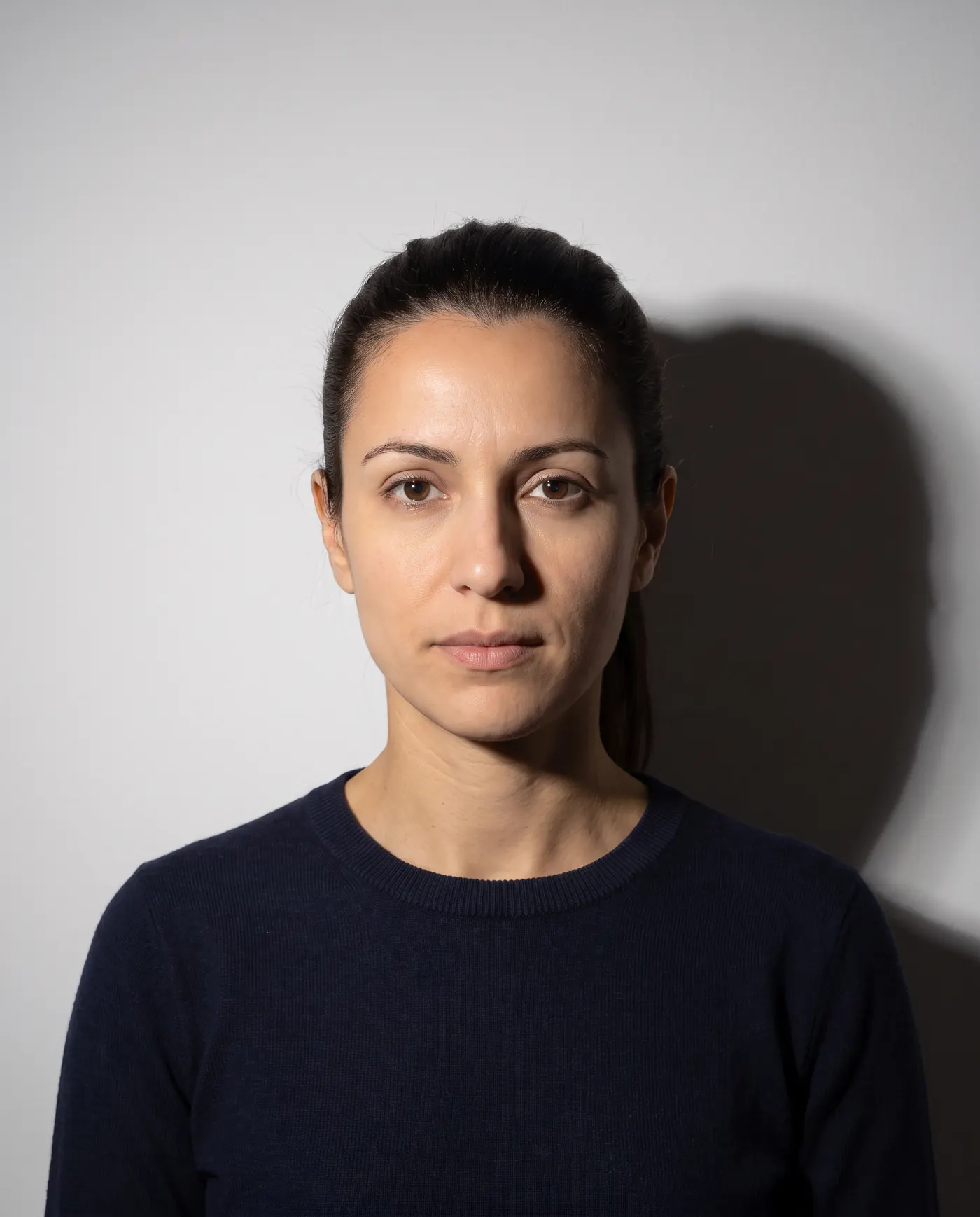 Rejected
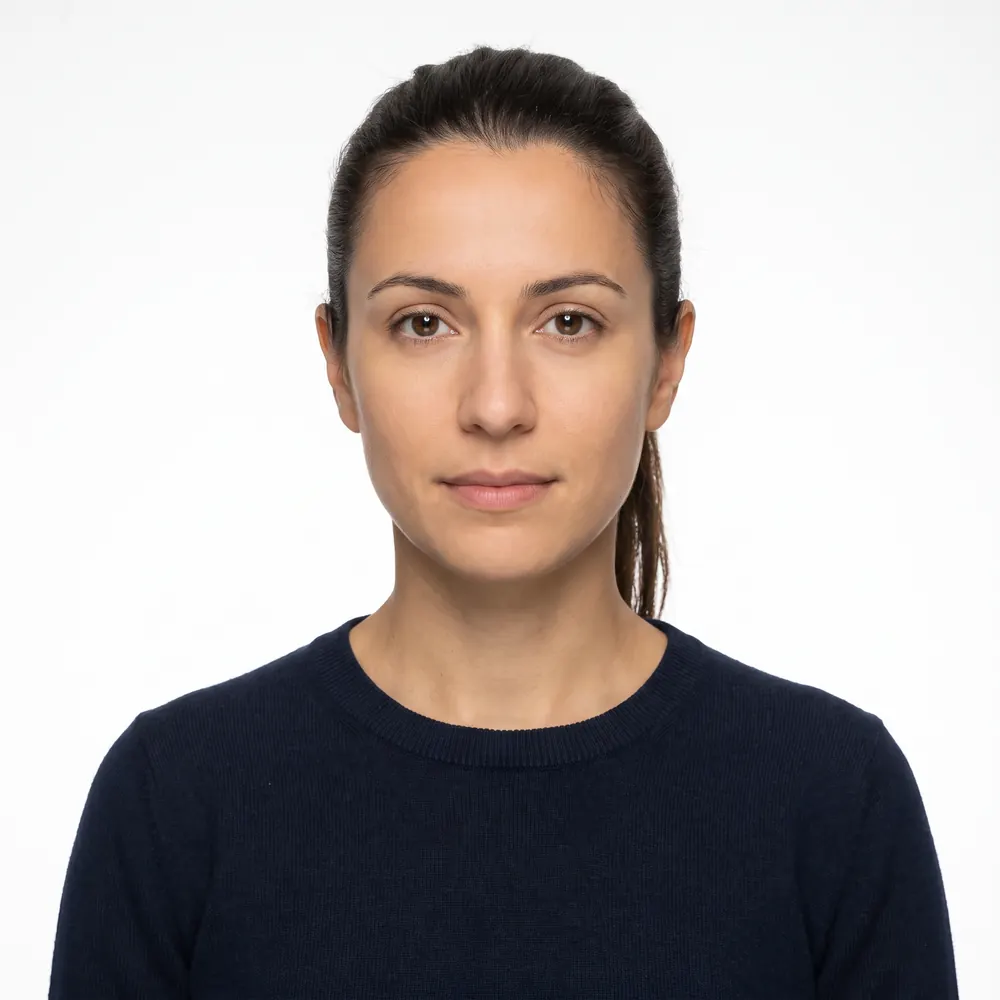 Accepted
Online is slightly different from paper
The appearance rules are the same family as the paper US passport photo requirements, with three differences worth knowing if you have used a paper photo before:
| Online renewal | Paper form (DS-82, DS-11) | |
|---|---|---|
| What you submit | 1 digital file | 1 printed photo, stapled to the form for DS-82 |
| Size | No pixel size; crop in the application | 2 x 2 in (51 x 51 mm), head 1 to 1 3/8 in |
| Formats | JPG, JPEG, PNG, HEIC, HEIF, 54 KB to 10 MB | Matte or glossy photo-quality paper |
| Expression wording | "Neutral facial expression or natural smile. Avoid showing teeth." | "You can smile... make sure your eyes are open and your mouth is closed." |
| Head covering statement | Not mentioned on the upload page | Signed religious or doctor's statement with the application |
The expression wording lands in the same place: a closed-mouth smile at most. The religious head covering rule on the upload page is that the covering must be one color, without patterns or small holes. The general photo page says the signed statement applies "if you are applying in person or by mail."
Passport cards renew online too
The renewal page's table says you can renew a card, a book, or both online, and add a card to a book or a book to a card. Switching from a card only to a book only, or the reverse, means renewing by mail. Either way there is one digital photo, not a separate card photo. The fees listed on September 4, 2026 were $130 for a book, $30 for a card and $160 for both. More in our passport card photo guide.
Why your current passport photo won't work
It is tempting to scan or photograph the portrait page of the passport you are renewing. The upload page rules this out three ways: the photo must be taken in the last 6 months, it must be an original digital image, and the Department lists a "scanned copy and not an original, digital image" as unacceptable. An old print from a pharmacy fails for the same reasons. The longer answer, including when you can and can't reuse a photo across different applications, is in can you reuse an old passport photo.
Take the photo, step by step
- 1
Confirm you are eligible to renew online
Age 25 or older, 10-year passport expiring within a year or expired less than 5 years ago, no name or sex change, in the US, no travel for 6 weeks. If not, you need a printed photo for a paper form.
- 2
Set up the wall and the light
Plain white or off-white wall, or a white sheet over a colored one. Stand several feet in front of it. Face a window for even daylight and switch off overhead lights that shadow the eyes.
- 3
Get the camera to eye level, several feet away
A second person, or the phone propped at eye height on a self-timer. Glasses, hat, lanyard and ID badge off. Face the lens, head level, both eyes open, mouth closed.
- 4
Frame wide enough to crop
Head centered, bottom of the frame at the edge of your shoulders, a margin of wall around your head. Take several shots and pick the sharpest.
- 5
Move the original file to the renewal device
Not by text message. Check it is a JPG, JPEG, PNG, HEIC or HEIF between 54 KB and 10 MB before you open the application.
- 6
Upload, crop, read the result
Reposition and crop inside the application. If the tool rejects it, change the one thing it names and retake; do not edit the photo.
The renewal photo checklist
- One color photo, taken in the last 6 months
- JPG, JPEG, PNG, HEIC or HEIF, between 54 KB and 10 MB
- Plain white or off-white background, no shadows, texture, lines or objects
- Head and shoulders centered, bottom edge at the shoulders
- Even natural light, sharp, both eyes open, no teeth showing
- Eyeglasses, a hat, or a scarf covering part of the face
- Filters, retouching, an edited outline or an AI-generated version
- A scan or photo of a printed photo, including your old passport
- A file sent to yourself by text message
- Red eye edited out instead of retaken in natural light
Where our tool fits, honestly
We are an independent photo service, not the State Department, and we cannot submit or sign your renewal: the Department is clear that only you can complete it, on opr.travel.state.gov.
What we do is the part before the upload. Start with a phone photo taken against a real white wall, and we check head position, tilt, background evenness, sharpness and exposure, then give you a file in a format the renewal system accepts, inside the 54 KB to 10 MB window. You see the result before paying and pay only at download: $4.99 for the digital file, or $6.99 with a 4 x 6 print sheet if you also need a print for a paper form. If the office handling your application rejects the photo, we refund you.
We can't detect glasses or judge expression, so those two stay with you. What no tool should do is repaint your background or smooth your face. The Department checks for exactly that. If your wall is not white, cover it with a white sheet and take the photo again.
Frequently asked questions
What size photo do I need to renew my US passport online?
There is no fixed pixel size. The State Department asks for a JPG, JPEG, PNG, HEIC or HEIF file between 54 KB and 10 MB, in color, taken in the last 6 months. You reposition and crop the photo inside the application, so upload a shot with a little room around your head and shoulders.
Can I use a selfie for online passport renewal?
The State Department does not ban selfies by name, but its rules are hard to meet at arm's length. It asks you to stand several feet from the camera, face it directly and keep your head untilted, and its tips assume someone else takes the photo. A second person, or a propped phone on a timer, gets much closer.
Can I reuse my old passport photo to renew online?
No. The upload page asks for one color photo taken in the last 6 months, and the file must be the original digital image, not a scan or a photo of a printed photo. The picture in your current passport fails on both counts.
What happens if the upload tool rejects my photo?
The State Department says the system will tell you what you need to change, and you can try again with a different photo. Fix the one thing it names, usually background, shadows, framing or glasses, then take a new photo rather than editing the old one.
Can my renewal photo still be rejected after I submit?
Yes. The automatic check covers basic requirements only. An employee reviews the photo after the application arrives and, if there is a problem, sends a letter or email asking for a new photo. The State Department says you must respond within 90 days of the date on that letter or email.
Can I renew online if I need a new photo because my appearance changed?
Yes, the photo is new either way. What matters for online renewal is eligibility: age 25 or older, a 10-year passport expiring within a year or expired less than 5 years ago, no name or sex change, and no travel for at least 6 weeks. Appearance is not on that list.
Sources
- U.S. Department of State - Uploading a Digital Photo (last updated May 4, 2026; read on the adoption.state.gov mirror)
- U.S. Department of State - Renew Your Passport Online (last updated September 4, 2026)
- U.S. Department of State - Passport Photos (last updated March 24, 2026)
- U.S. Department of State - Respond to a Letter or Email
- U.S. Department of State - Renew by Mail (last updated July 21, 2026)
Keep reading
 Requirements
US Passport Photo Requirements (2026): Complete Checklist
Every US passport photo rule in one checklist: 2x2 inch size, head height, white background, expression, glasses, head coverings and online renewal.
Read the guide Troubleshooting
Passport Renewal Photo Rejected? What to Do Next
Why online passport renewal bounces a photo, what each rejection means and how to replace it, with the file rules and the fix for every failure.
Read the guide Requirements
Green Card Photo 2026: I-485 Prints vs Biometrics
Green card photos after USCIS's December 2025 change: the card photo is taken at biometrics, yet I-485 instructions still list two prints. What each says.
Read the guide Requirements
Turkey e-Visa Photo: JPG or PNG, 200x200 px Minimum
Turkey's e-Visa portal now requires a biometric profile photo: JPG, JPEG or PNG up to 4 MB, at least 200 x 200 px, and the ICAO rules it links.
Read the guide Requirements
Saudi eVisa Photo: 200x200 px, 5-100 KB, White
The official Saudi eVisa photo spec: 200 x 200 px, 5 to 100 KB, white background, face 70-80%, under six months old, and how we verified it.
Read the guide Requirements
Kenya eTA Photo: A Selfie or Passport-Type Photo
Kenya's official eTA site asks for a 'selfie or passport-type photo' and publishes no size, format or background rule. What the portal does require.
Read the guide