Troubleshooting
Shadows in Passport Photos: 6 Fixes Before You Submit
Why shadows get passport photos rejected, which small ones the UK tolerates, and 6 fixes to make before the shot. Checking is free; pay only at download.
By Antoine Duno
Published 8 min read
A shadow is the one passport photo fault you can see in the viewfinder before you press the shutter, and the one you can't honestly fix afterwards. It comes from where you stand and where the light is. Change those two things and it goes away.
Every authority we checked forbids it in some form. GOV.UK says your photo must "not have any shadows on your face or behind you". Canada asks for "uniform lighting and no shadows, glare or flash reflections". ICAO's Doc 9303 wants a scanned portrait "centred, clear and in sharp focus with no shadows".
Where the shadow comes from
The two kinds of shadow have different causes, so start by working out which one you have.
| Where you see it | What caused it | Fix |
|---|---|---|
| Dark outline on the wall beside or behind your head | You're standing close to the wall, with the light off to one side | 1 and 2 |
| One cheek darker than the other, a nose shadow across it | Light coming from the side: a window, a lamp | 2 and 3 |
| Dark eye sockets, shaded upper lip and neck | Ceiling light shining down | 2 |
| A dark band across the forehead or eyes | Hair, a cap-like fringe or a head covering overhanging the face | 4 |
| Dark lines or patches next to the eyes | Glasses frames, or light bouncing off the lenses | 5 |
| Hard-edged shadow on the wall, shiny spots on the skin | Flash fired straight at you | 6 |
The photo below shows the first three together. The wall is plain and light, but the light is coming from the side of the room, so the subject's head throws a large shadow on the wall and half of her face sits in shade.
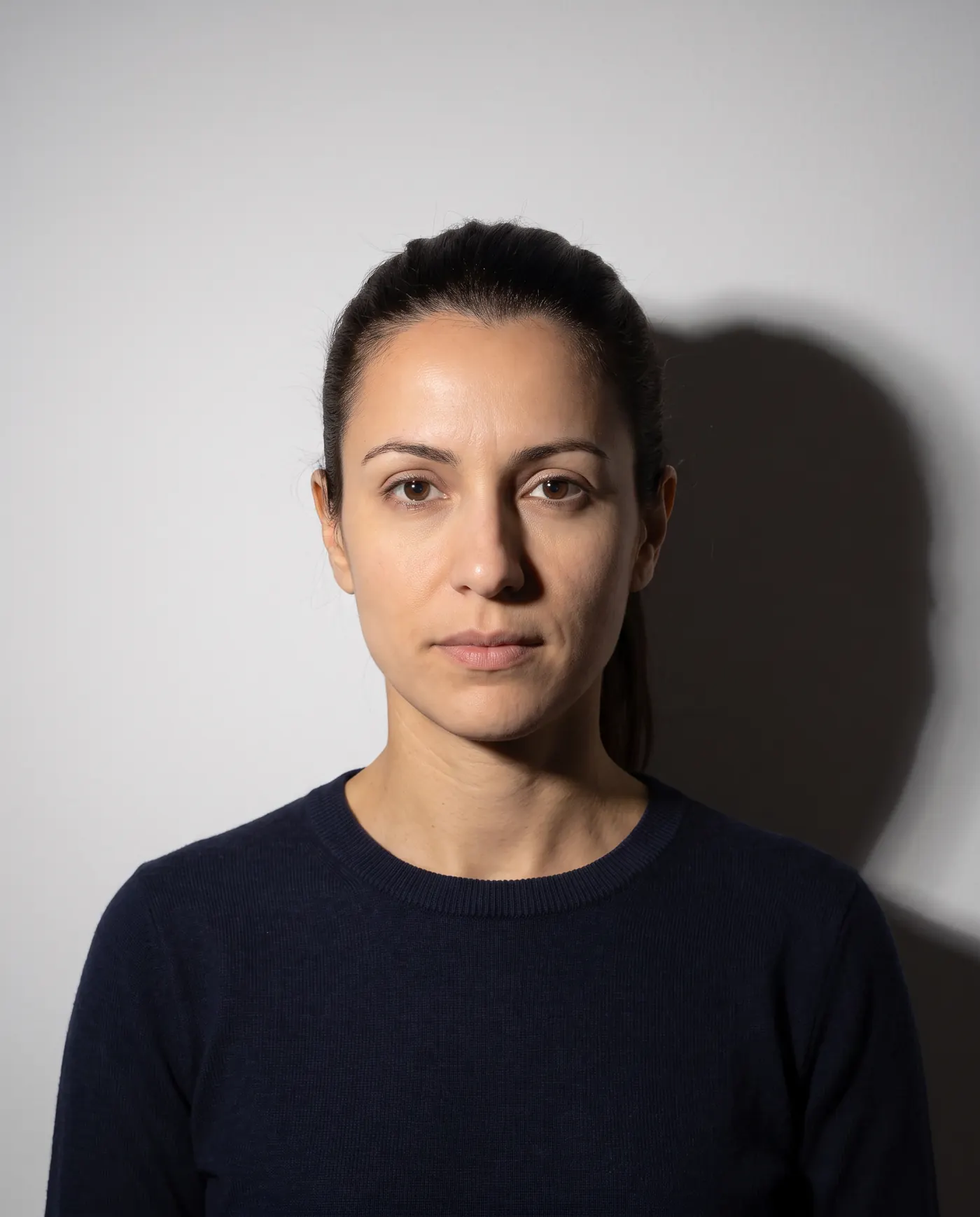 Rejected
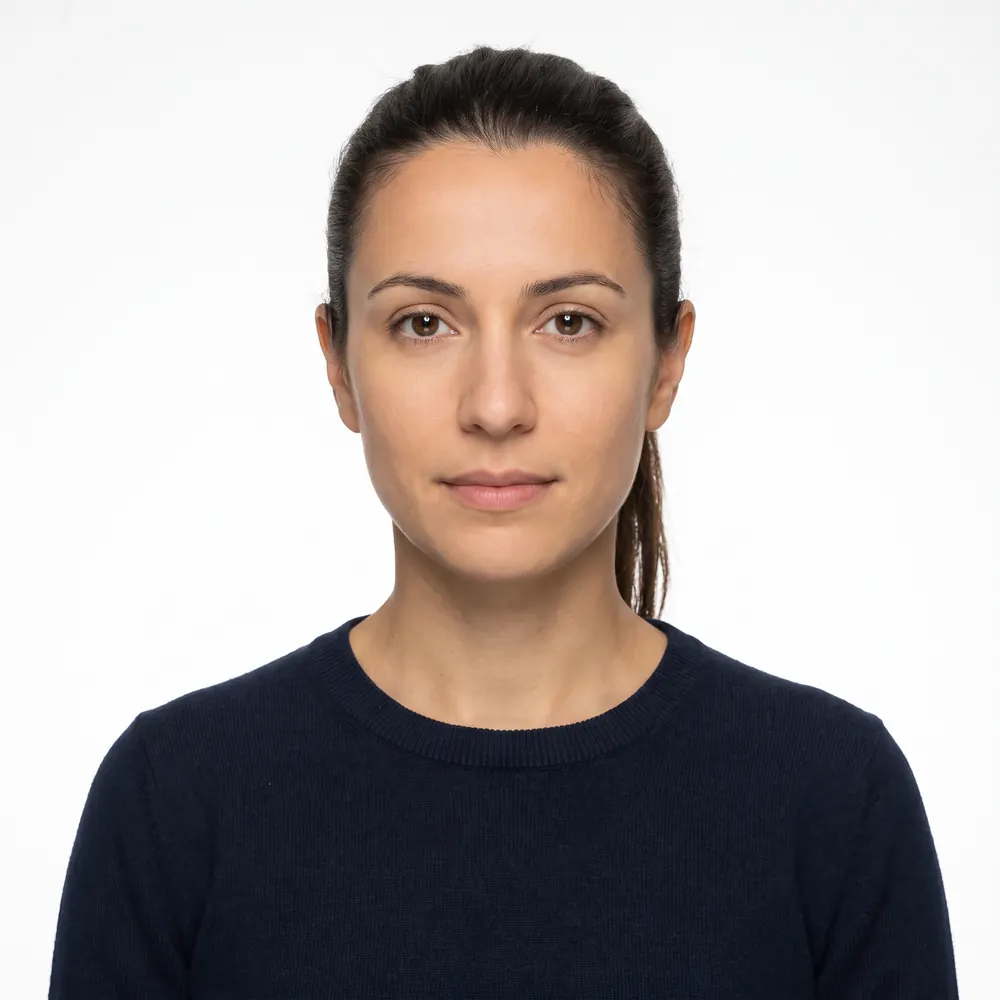 Accepted
What the rules actually say
Authorities don't all draw the line in the same place. Here's the wording from each official page we read on September 16, 2026.
| Authority | What it says about shadows |
|---|---|
| UK, GOV.UK (printed and digital photos) | Must "not have any shadows on your face or behind you" |
| UK, HM Passport Office caseworker guidance v51.0 | Reject photos with shadows on or around the face "if the shadows hide the customer's face"; small shadows under the chin, beneath the ears or behind the head can be accepted if the features stay visible |
| Canada, passport photos (IRCC) | "Uniform lighting and no shadows, glare or flash reflections"; shadows around the ears, in the background, and across the face or shoulders are listed as unacceptable |
| ICAO Doc 9303, Part 3 | A scanned portrait must be "centred, clear and in sharp focus with no shadows" |
The UK caseworker guidance is the most forgiving text here, and it's written for examiners, not applicants. It tells them what they may let through. It doesn't promise that a photo with a shadow behind the head will pass, and Canada lists exactly that kind of shadow as unacceptable. If you're taking the photo anyway, take one with no shadow at all.
HM Passport Office's video on digital photos names "shadows on your face" among the common mistakes, next to accidental smiles, hair, glasses and blur. Our guide to why passport photos get rejected covers the rest of that list. The US State Department's own wording is quoted in our US passport photo requirements guide.
The 6 fixes
1. Step away from the wall
A shadow on the wall is a distance problem more than a lighting problem. With your head a few centimetres from the wall, any light that isn't straight in front of you throws your outline onto the paint right next to your head, where the camera sees it.
The passport service's how-to page gives numbers: "stand 50 centimetres (1.5 feet) away from your background (this reduces shadow)", with "the person taking the photo" standing "1.5 metres (5 feet) from you". Treat 50 cm as the minimum. The further the wall is behind you, the more a shadow drops out of the frame and softens.
2. Face the light, and switch the ceiling light off
GOV.UK asks for "balanced light – no shadows on your face or behind you" and says "it's best to use natural sunlight, for example facing a window." That's the whole setup: daylight coming straight at your face, with the photographer standing between you and the window, or just to one side of it.
Ceiling lights work against you. Light from above leaves the eye sockets, the area under the nose and the neck in shade, and mixes a warm indoor colour with the daylight. Turn them off. Direct sun is too harsh, so if sun is shining through the window, wait for a cloud or pick a window on the shaded side of the house. Our guide to passport photo lighting at home goes through the window setup step by step.
3. Even out the two sides of your face
If one cheek is darker than the other, the light is off-centre. Turn your whole body until you face the light squarely, then check that both cheeks look the same brightness on the screen. If the room has one small window, ask the photographer to hold a large piece of white card or a white sheet just out of frame on the darker side to bounce some light back.
Don't solve it by turning only your head. Keep facing the camera straight on and move your feet instead.
4. Keep hair and head coverings off the face
A heavy fringe or hair falling forward over the forehead throws a band of shade across the eyes, even in good light. Pin it back so your eyebrows and eyes are clear.
Religious head coverings are allowed, but the rules about shadows still apply to them. Canada says a head covering "must not create shadows on your face", and the UK caseworker guidance tells examiners to reject headwear that "casts a shadow on or around the face if the shadows hide the customer's face". Adjust the fabric so it doesn't overhang your forehead, and light your face from the front at head height. Our hijab passport photo guide covers the full rules.
5. Take glasses off, or deal with the frames
Frames can shade the eyes and lenses can glare. GOV.UK says not to wear glasses unless you have to, and if you do, "you must make sure your eyes are not covered by the frames or any glare, reflection or shadow." Canada: "There must be no glare on the lenses." Some authorities don't allow glasses at all. The country-by-country rules are in our guide to glasses in passport photos.
6. No direct flash
A flash fired straight at your face flattens it, puts a hard shadow on the wall behind you, and leaves shiny spots on the skin. Canada rules out "flash reflections", and HM Passport Office's photographers' guidance (2014) asks for "uniform lighting, with no shadows or flash reflection on the face". Turn the phone flash off and use daylight. If the room is so dark that the photo turns grainy without flash, you have a different problem, covered in our guide to blurry passport photos.
Why you shouldn't edit the shadow out
Editing looks like the easy fix: lighten the dark side of the face, paint the wall white. It's also the one fix the rules name.
- Canada lists changes to "brightness" and "contrast" among the edits it rejects, and names "changing the background, including removing shadows". Its page says: "We'll reject your application if the photos have been altered in any way."
- UK: photos must be "unaltered by computer software", and the digital rules say "you can't 'correct' your passport photo".
- ICAO Doc 9303 says the displayed portrait must "not be digitally altered or enhanced to change the subject's appearance in any way".
Background replacement tools also cut around your hair and ears, and a changed head outline is exactly what reviewers look for. Our guide to a white background at home shows how to get a plain wall without software, and AI-edited passport photos explains where cropping stops and editing starts.
Check the shot before you submit
- 1
Set up with the wall behind you and the window in front
At least 50 cm between the back of your head and the wall. Ceiling lights off, flash off, daylight on your face.
- 2
Take several shots
Have someone else take them from about 1.5 metres away, with the camera at eye level. Small changes in angle move shadows, so a few frames give you a choice.
- 3
Zoom in on the full-size image
Check both cheeks, the eye sockets, under the nose and the wall on each side of your head. A phone thumbnail hides shadows that are obvious at full size.
- 4
Retake instead of editing
If you see a shadow, move further from the wall or turn towards the light, and shoot again. No brightening, no background tools.
- 5
Run a free check before paying for anything
Upload the original to the checker, pick your document, and read the background and exposure results before you download.
Here's what that check can and can't see. The background test measures how even the wall is, so a shadow cast behind your head shows up as a warning or a fail. The exposure test flags a large area crushed to black. It doesn't map shadows across your face, and it can't tell whether you're wearing glasses, so step 3 is still up to you. There's an optional "even out the lighting" setting that applies one brightness and colour correction to the whole frame. It can't remove a shadow, and if your authority rules out brightness changes, as Canada does, leave it off. You can run the check on your photo before deciding anything.
- At least 50 cm between the back of your head and the wall
- Facing a window in daylight, ceiling lights off
- Both cheeks the same brightness, no shadow from the nose
- Eyebrows and eyes clear of hair and fabric
- Glasses off, or frames and lenses leaving the eyes clear
- Head outline visible on the wall beside you
- Dark eye sockets from a ceiling light
- Phone flash fired straight at the face
- Shadow brightened or background repainted in an app
If your photo has already been refused online in the UK, UK passport photo rejected maps each message the service shows to a fix.
Frequently asked questions
Will a small shadow get my passport photo rejected?
It depends on the authority. HM Passport Office's caseworker guidance lets examiners accept small shadows under the chin, beneath the ears or behind the head, as long as the facial features stay visible. Canada's passport rules list shadows around the ears and in the background as unacceptable. Aim for none.
How far from the wall should I stand to avoid a shadow?
HM Passport Office tells UK applicants to stand 50 centimetres (1.5 feet) away from the background, which it says reduces shadow, with the photographer 1.5 metres (5 feet) from you. If a shadow still shows, move further from the wall and make sure the light is in front of you rather than beside you.
Can I remove a shadow from my passport photo with an app?
No. Canada's passport photo page lists changing the background, including removing shadows, as an alteration that gets an application rejected. GOV.UK requires photos unaltered by computer software, and ICAO's Doc 9303 says the portrait must not be digitally altered to change the subject's appearance. Retake the photo instead.
Why does my face have a shadow on one side?
The light is coming from the side. A window or lamp to your left or right lights one cheek and leaves the other in shade, often with a nose shadow across it. Turn to face the light source directly, switch off lamps beside you, and keep the camera between you and the window.
Do overhead lights cause passport photo shadows?
Yes. A ceiling light shines down, so the brow, nose and chin shade the eye sockets, upper lip and neck. GOV.UK asks for balanced light with no shadows on your face, and HM Passport Office suggests natural sunlight, such as facing a window. Switch ceiling lights off and use daylight from the front.
Does your photo checker detect shadows on my face?
Not directly. It measures how even the background is, so a shadow cast on the wall behind you shows up as a warning or a fail, and it flags large areas crushed to black. It does not map shadows across the face itself, so zoom in on the full-size image and look for them yourself.
Sources
- GOV.UK - Get a passport photo: printed photos
- GOV.UK - Get a passport photo: digital photos
- HM Passport Office - Rules for digital passport photos
- HM Passport Office - How to take a digital passport photo
- HM Passport Office - Photo standards: caseworker guidance, version 51.0
- HM Passport Office - Passport photos: guidance for photographers (2014)
- IRCC - Photos for Canadian passports (modified 2026-02-11)
- ICAO - Doc 9303, Part 3: Specifications Common to all MRTDs (Eighth Edition, 2021)
Keep reading
 Requirements
Why Passport Photos Get Rejected: 10 Real Causes
The ten reasons passport and visa photos really get rejected, the official rule behind each and the fix, plus specs for print, renewal and the DS-160.
Read the guide Rules
Glasses in Passport Photos: Rules in 10 Countries
Can you wear glasses in a passport photo? Official rules for the US, UK, Ireland, Canada, Australia, NZ, India, France, Germany and Spain.
Read the guide Troubleshooting
UK Passport Photo Rejected Online? 8 Fixes That Work
What the UK online photo check measures, what examiners reject afterwards, and 8 fixes from HM Passport Office's own guidance, including when to override.
Read the guide Rules
Hijab in a Passport Photo: Religious Covering Rules
Can you wear a hijab, turban or other religious head covering in a passport photo? The exact wording from the US, UK, Canada, Australia, Ireland and India.
Read the guide Requirements
AI-Edited Passport Photos Get Rejected in 2026
The State Department says it checks photos for AI tools and will not accept edited or filtered images. What counts as an edit, and what is still allowed.
Read the guide Rules
Can You Smile in a Passport Photo? Rules by Country
Can you smile in a passport photo? Official answers for the US, UK, Canada and Schengen visas, plus glasses, makeup, hair, head coverings and babies.
Read the guide